A long flight is one of the best places to read manga. Nobody needs you for ten hours, the cabin lights go down, and there is nothing else to do. The only problem is choosing. A 100-volume series is too much, and starting a story you cannot finish before landing is a little sad.
So here are four manga that fit the trip. All four are finished, all four are short, and each one works in the air for a different reason. After the list there is a short checklist for getting them onto your iPhone before you board, using ComicFlow, the manga reader I build. It is $2.99 once, with an optional $6.99 one-time Pro unlock, and nothing in the checklist needs Pro.
Disclosure: I make ComicFlow at Applestan. The reader features below were checked against the app's source code for version 3.8, and the series facts against Wikipedia's entries and the publisher listings they cite, on November 10, 2026.

Quick Reference #
| # | Series | By | Volumes in Japan | Status | Best for |
|---|---|---|---|---|---|
| 1 | Pluto | Naoki Urasawa, with Takashi Nagasaki | 8 | Completed (2009) | One flight, one complete thriller |
| 2 | Planetes | Makoto Yukimura | 4 | Completed (2004) | A short flight, or looking out the window |
| 3 | Erased | Kei Sanbe | 9 | Completed (2016) | Staying awake on a night flight |
| 4 | Mushishi | Yuki Urushibara | 10 | Completed (2008) | Reading between naps |
If you only take one, take Pluto. If you think you will sleep half the way, take Mushishi.
1. Pluto #
By: Naoki Urasawa, co-written with Takashi Nagasaki | Volumes: 8 (completed, 2003 to 2009) | Genre: Sci-fi / mystery thriller
Robots and humans are being killed around the world, and every victim is left with objects placed at the head like a pair of horns. Gesicht, a robot detective for Europol, follows the case from country to country. The trail leads to the most advanced robots on Earth, and Gesicht is one of them.
Pluto is a retelling of "The Greatest Robot on Earth", a story arc from Osamu Tezuka's Astro Boy. You do not need to know Astro Boy to enjoy it. Urasawa, who also made Monster and 20th Century Boys, turns it into a slow, sad detective story about grief and war. It won the Tezuka Osamu Cultural Prize, Viz Media publishes all 8 volumes in English, and Netflix released the anime in October 2023.
Why it fits a flight: 8 volumes is one story with one ending, and Urasawa ends almost every chapter on a hook. That is exactly what you want when the movies on the seat screen are bad.
How to read it: put all 8 volumes on your phone before you leave. If they come as one ZIP or RAR with every volume inside, ComicFlow 3.8 imports a ZIP or RAR with several comics and adds each volume as its own book. When you wake up somewhere over the ocean, the Continue Reading card at the top of the library takes you back to the page you stopped on.
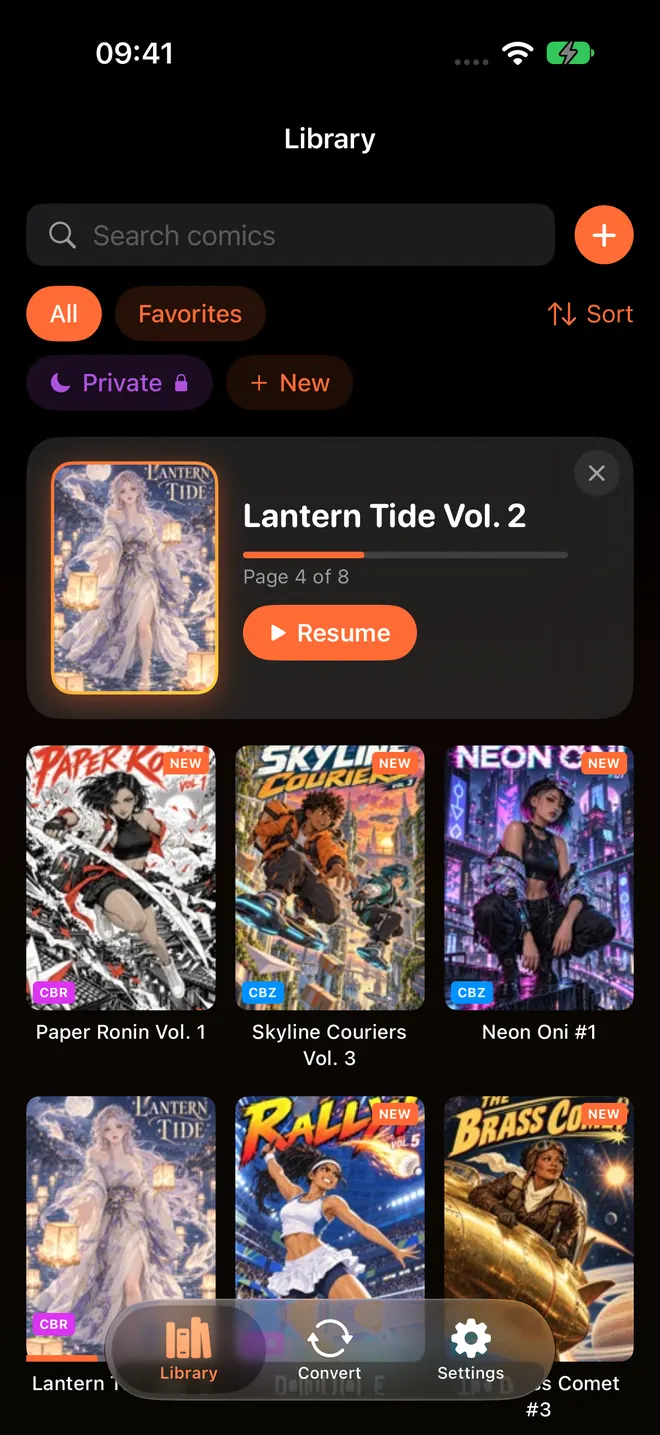
The Continue Reading card shows the book and page you stopped on. Tap Resume to jump back in.
2. Planetes #
By: Makoto Yukimura | Volumes: 4 (completed, 1999 to 2004) | Genre: Hard sci-fi / drama
It is 2075, and the space around Earth is full of junk. Hachimaki is part of a small crew that collects space debris, the least glamorous job in orbit. He wants to own his own spaceship one day. The crew around him has its own reasons to be up there, from a rookie who believes in love a little too much to a man who is still looking for something he lost in an accident.
This is the first series by Makoto Yukimura, years before Vinland Saga. It takes the science seriously, with radiation, bone loss and the long distances between planets, but it is really about why people chase big dreams. The manga and the 26-episode anime both won the Seiun Award. In English, Tokyopop published it first, and Dark Horse later reissued it in two omnibus volumes.
Why it fits a flight: 4 volumes is the shortest series here, so it works on a flight of a few hours too. And reading about orbit with clouds outside your window is a very good feeling.
How to read it: Yukimura draws a lot of black space. ComicFlow's reader Background Color is Black by default, so the area around the page stays dark and does not light up the cabin. If you have changed it, you can set it back under Background in Reader Settings.
3. Erased #
By: Kei Sanbe | Volumes: 9 (completed, 2012 to 2016) | Genre: Mystery / thriller / time travel
Satoru is a 29-year-old manga artist who is not doing well. He also has a strange ability he calls Revival: sometimes, just before something terrible happens, time jumps back a few minutes so he can stop it. Then his mother is murdered, Satoru is blamed, and Revival sends him much further back, 18 years, to his childhood in Hokkaido in 1988. A classmate named Kayo is about to disappear, and he has one winter to save her.
Erased is a tight, scary mystery with a lot of heart. Volume 9 also collects Erased Re, a short side story. In English, Yen Press's hardcovers put two of the original volumes in each book, while its ebooks follow the original numbering, so check which one you have. There is an A-1 Pictures anime from 2016 and a Netflix live-action series from 2017.
Why it fits a flight: on a night flight it is easy to fall asleep at the wrong moment. Erased does not let you. Every volume ends on a twist.
How to read it: it is a whodunit, so bookmark any page with a clue. Tap the page to show the controls and tap Bookmark. When the answer comes, open the bookmark list and check if you were right. For a quiet cabin, try Page Curl in the Display section of Reader Settings. ComicFlow 3.8 added it, and the pages turn like paper. With Right to Left (Manga) set, the curl turns the way a printed manga does.
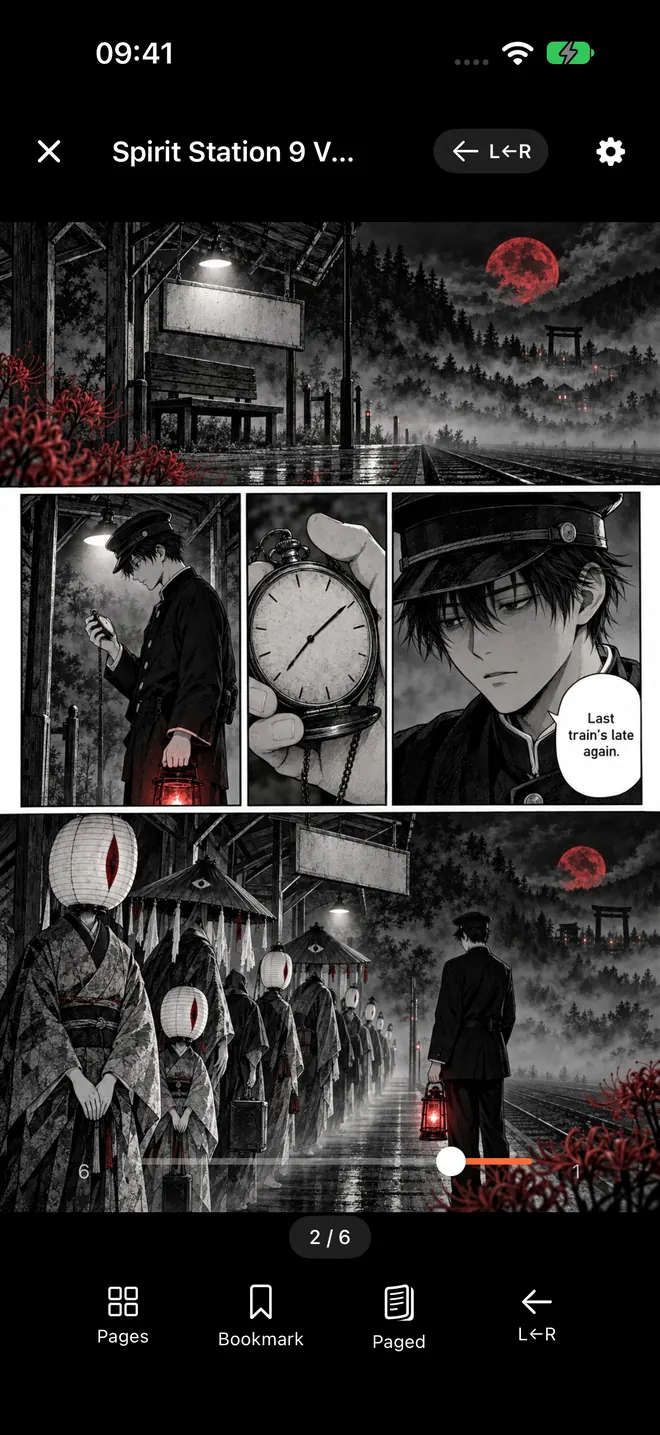
The reader in right-to-left mode. Bookmark sits in the bar at the bottom, and the gear for Reader Settings is at the top.
4. Mushishi #
By: Yuki Urushibara | Volumes: 10 (completed, 1999 to 2008) | Genre: Supernatural / folklore / slice of life
Mushi are the most basic forms of life: not quite animals, not quite plants, and invisible to most people. Ginko can see them. He is a mushi master who travels through the mountains and villages of an old, quiet Japan, helping people whose strange illnesses or troubles are caused by mushi.
Almost every chapter is a complete story. Ginko is the only main character, and there is no big plot to keep track of. It is calm, beautiful and a little eerie, and it won the Kodansha Manga Award. Del Rey published all 10 volumes in English, and Kodansha USA started a collector's omnibus edition in November 2025.
Why it fits a flight: you can read one chapter, sleep for two hours, and start the next one without forgetting anything. It is the perfect series for a flight where you drift in and out.
How to read it: ComicFlow keeps the screen awake while you read, because Keep Screen On is switched on by default. That is great at home, but on a plane you might fall asleep mid-chapter with the screen still on. If you think you will doze off, switch Keep Screen On off in the Display section of Reader Settings, and your iPhone will lock on its own as usual. Older Mushishi scans often have wide paper margins, too. Trim Margins, in the same section, crops those borders so the art fills more of the screen.
Before you board: a short checklist #
Gate Wi-Fi is slow and plane Wi-Fi is often expensive. Do all of this at home.
- Add the books while you still have Wi-Fi. ComicFlow copies every file you add into its own library on your iPhone. Once a book is in the library, it opens with no connection at all, so airplane mode is fine. Files that sit only in iCloud Drive have to download first, so do not leave this for the gate.
- Send a whole series in one go. From your computer, Wi-Fi Upload lets you drag files onto a page in any browser on the same network. A ZIP or RAR with all the volumes inside works too.
- Open volume 1 once and set the direction. Choose Right to Left (Manga) under Reading Direction. If your files carry a series name, ComicFlow remembers the direction for every book in that series.
- Check your storage. Scanned volumes can be big. If space is tight, manga storage full on iPhone has ways to make room.
- Charge your phone and pack a cable. No setting saves you from a dead battery over the ocean.
If you read from your own Komga, Kavita or OPDS server with ComicFlow Pro, download the series before you leave. On a series page, Download All saves every book, and Keep Downloaded keeps the next unread books on your device. Reading manga from a NAS explains the server setup.
Getting these series as files you can read #
ComicFlow reads files you own: CBZ, CBR, ZIP, RAR and PDF. It does not open EPUB, and books bought inside store apps such as Kindle or BookWalker stay in those apps. Two routes work:
- Buy DRM-free where you can. Where to buy DRM-free manga lists the stores I could confirm and what format they sell.
- Scan volumes you already own. How to scan manga you own covers it.
What is included without Pro #
Everything in the list and the checklist is in the $2.99 app: offline reading, importing a ZIP or RAR with several volumes, Wi-Fi Upload, right-to-left reading saved per book and per series, the Continue Reading card, bookmarks, Page Curl, Trim Margins, Keep Screen On and the reader background. There are no ads or ad tracking.
ComicFlow Pro is an optional $6.99 one-time unlock, not a subscription. It adds Komga, Kavita and OPDS server libraries (with Download All and Keep Downloaded), saved reader presets, Face ID-locked collections and EPUB export for Kobo, Boox, reMarkable and PocketBook e-readers.
How this was checked #
ComicFlow claims in this post were checked against the version 3.8 source code, in these files:
- Keep Screen On (on by default), Background Color (Black by default), Trim Margins and Page Curl:
ComicFlow/Reader/ReaderSettings.swift,ComicFlow/Reader/Views/ReaderControlsOverlay.swift - Imported files copied into the app's library:
ComicFlow/Services/ImportPipeline.swift - Reading direction remembered per series:
ComicFlow/Reader/ReaderContinuity.swift - Download All and Keep Downloaded for server series:
ComicFlow/Views/Servers/ServerLibraryScreens.swift - What Pro covers:
ComicFlow/Services/Pro/ProGate.swift
Series facts were checked on November 10, 2026 against the Wikipedia entries for Pluto, Planetes, Erased and Mushishi, and the publisher listings they cite.
Related reading #
- 4 manga to binge in a weekend: longer series for when you are back home
- How to read comics offline on iPhone and iPad: the full offline setup
- Import a manga series from one ZIP or RAR: new in ComicFlow 3.8
- Bookmark manga pages on iPhone: for the clues in Erased
- Best manga reader settings on iPhone: direction, layout and Trim Margins
ComicFlow sends anonymous usage analytics to help improve the app, and you can switch that off in Settings, then Privacy, then Share Usage Data. Your manga files stay on your device. The privacy policy has the full list.
Frequently asked questions
What manga should I read on a long flight?
Pick a series that is finished and short enough to complete in the air. Four good choices are Pluto by Naoki Urasawa (8 volumes), Planetes by Makoto Yukimura (4 volumes), Erased by Kei Sanbe (9 volumes) and Mushishi by Yuki Urushibara (10 volumes of standalone stories).
Can I read manga on my iPhone without Wi-Fi on a plane?
Yes, if the manga is on the phone as files before you leave. ComicFlow copies every CBZ, CBR, ZIP, RAR or PDF you add into its own library on the device, so the books open in airplane mode with no connection. Add them at home while you still have Wi-Fi.
How do I put a whole manga series on my iPhone before a trip?
If the series is one ZIP or RAR that holds every volume, add that file to ComicFlow 3.8 and each volume comes out as its own book. You can also drag the files onto ComicFlow's Wi-Fi Upload page from a browser on your computer, or add them from the Files app. All of this is in the $2.99 app.
Is Mushishi good for a flight if I keep falling asleep?
Yes. Mushishi is an episodic anthology: Ginko is the only main character, and almost every chapter is a complete story. You can read one, nap, and start the next without losing the plot. It ran from 1999 to 2008 and is finished in 10 volumes.
Do I need a subscription to read these on iPhone?
No. ComicFlow costs $2.99 once, with no subscription and no ads. Offline reading, right-to-left mode, bookmarks, page curl and Trim Margins are all included. An optional $6.99 one-time Pro unlock adds comic server libraries, reader presets, Face ID-locked collections and EPUB export for e-readers.