This week a long argument about manga piracy ran across X. On one side, people in Japan saying that if a series is not sold where you live, you should go without it. On the other, readers abroad saying that for a lot of series there is simply no legal way to pay. I am not going to settle that here. Both sides have a point, and for many titles the honest answer is that legal options are limited.
What I can do is answer the question that kept coming up in the replies: where can you actually buy manga as a file you keep? Here is every source I could confirm on October 23, 2026, what each one sells and in which format, plus how to read the files right to left on an iPhone or iPad. The reader I use is ComicFlow, which I build: $2.99 once, with an optional $6.99 one-time Pro unlock.
Disclosure: I make ComicFlow at Applestan. Every store below was checked on its own site on October 23, 2026, and every ComicFlow feature against the app's source code for version 3.7. The sources are listed at the end. No links in this post are affiliate links.

What DRM-free means for manga #
DRM is the lock that ties a book to one store's app. Buy a volume on Kindle or BookWalker and you can read it there, but you cannot open it in another app, copy it to a drive, or keep reading if the store or your account goes away.
A DRM-free manga volume is just a file: a PDF, a CBZ (the page images in a ZIP), or an EPUB. You download it once and it is yours to read in any app and back up wherever you like.
For Western comics there are quite a few DRM-free stores, and where to find DRM-free comics covers publishers like Image Comics. For manga the list is much shorter, so this post is only about manga.
The short list #
| Store | What it sells | Formats | Opens in ComicFlow |
|---|---|---|---|
| Humble Bundle | Time-limited manga bundles, such as Kodansha's Blue Lock bundle | Per bundle. Blue Lock: PDF and EPUB | PDF, yes. EPUB, no |
| Fanatical | Manga and comic bundles, single volumes | Per item: CBZ, PDF, EPUB, MOBI | CBZ and PDF, yes |
| J-Novel Club | Its own licensed manga volumes | EPUB | No. Use an EPUB app |
| BOOTH | Japanese creators' own work, including doujinshi | Whatever the creator uploads, such as PDF or ZIP | PDF and ZIP, yes |
| Gumroad and creator shops | Indie manga artists selling direct | Usually PDF, sometimes ZIP or CBZ | Yes |
| Panels Store | Independent comics marketplace | CBZ, CBR, PDF or EPUB, per title | All but EPUB |
Everything in that table was true on October 23, 2026. Bundles end and stores change their terms, so check the product page before you buy.
Humble Bundle: Blue Lock and other manga bundles #
The bundle that started half the replies this week: on October 22, 2026, Kodansha and Humble launched Blue Lock: The Perfect Shot Bundle. It has Blue Lock volumes 1 to 38 and all seven volumes of the prequel Blue Lock: Episode Nagi, 45 volumes in all, for $30 at the top tier. Tiers start at $5, and part of the money goes to BINC, the Book Industry Charitable Foundation.
What I confirmed on the bundle page:
- DRM-free. Humble lists the bundle as a DRM-free download.
- PDF and EPUB. The page says the comics are available in PDF and ePub. Kodansha's own announcement also mentions CBZ, so if your download page shows a CBZ button, take it. Otherwise download the PDF for ComicFlow.
- Ends November 12, 2026, at 11 AM Pacific time, according to Kodansha.
- Volume 39 is a code, not a file. The $30 tier includes a code for volume 39, which Kodansha says adds the book to your Kodansha Reader library. It is redeemable until May 31, 2027.
Humble runs manga bundles every so often, between its many Western comic bundles. How to read Humble Bundle comics on iPhone and iPad walks through the download page and getting a whole bundle across in one go.
Fanatical: manga bundles and single volumes #
Fanatical sells game bundles, but also book, comic and manga bundles and some single volumes. Its help page on ebooks and comics says your orders download as CBZ, EPUB, PDF or MOBI, depending on the item, and it happens to list ComicFlow among the apps for CBZ files.
Two things to check before you buy:
- Look for the DRM Free label on each item. Fanatical marks its DRM-free books that way on the product page.
- Some comic bundles are app keys, not files. Fanatical's help pages describe an IDW bundle whose keys only work inside IDW's own app. Those books never become files.
On October 23, 2026, its manga listings included a Discover Pinoy Manga Bundle. Bundles rotate, so look at what is live when you read this.
J-Novel Club: DRM-free, but EPUB only #
J-Novel Club publishes light novels and manga in English and sells them directly on its own site, for Coins. Most manga volumes cost 899 Coins, which is $8.99. Its how-it-works page says its ebooks are DRM-free, can be read on any EPUB device, and stay yours once downloaded.
The catch for this post: the files are EPUB, and ComicFlow does not open EPUB. I would rather tell you that than have you find out after buying. J-Novel Club's manga reads fine in Apple Books or another EPUB app, and it is one of the few places selling licensed manga as DRM-free files at all.
BOOTH: Japanese creators selling their own work #
BOOTH is pixiv's marketplace, where Japanese artists sell doujinshi, original manga, art books and more, many of them as downloads. BOOTH's help center says plainly that it has no DRM (its answer in Japanese: DRM機能はありません). A download is the file the creator uploaded, such as a PDF or a ZIP of page images, and you get it from the confirmation email, your purchase history or your library.
A few things worth knowing:
- Most of it is in Japanese. Some creators publish English editions, but the bulk is untranslated. If you are learning Japanese with manga, that is a feature.
- ZIP files open in ComicFlow as they are. You do not need to unzip them first, as long as the ZIP holds the page images.
- BOOTH carries all-ages and adult items side by side, so check an item's rating before you buy.
Gumroad, creator shops and Kickstarter #
Plenty of indie manga artists, in Japan and elsewhere, sell their volumes directly. On Gumroad, a creator can stamp your email address on the first page of a PDF, and Gumroad's own help page says that this is not DRM and that it has no DRM tools. What you buy there is a plain file.
Crowdfunding is another route. Some manga translation campaigns on Kickstarter include a digital edition in their reward tiers. Read the tier carefully: a digital reward can be a PDF you download, or a code for someone's reading app.
Panels Store: independent comics #
Panels Store is a marketplace for independent comic creators and smaller publishers. Its terms say it does not use any DRM, and publishers upload in CBR, CBZ, PDF or EPUB. The catalog is mostly independent Western comics, so it is a place to browse rather than to look for a specific manga series. Take the CBZ, CBR or PDF when a title offers one.
Legal, but not files #
These are legitimate ways to read manga. They just do not give you a file, so what you buy there stays in that store's app and will not open in ComicFlow or any other reader.
- BookWalker. Its help page says books are protected with LCP DRM. You can read them in a handful of LCP-compatible apps, but the EPUB is encrypted and, in BookWalker's words, cannot be opened, converted or extracted as a normal EPUB.
- Kindle and ComiXology. When ComiXology moved its store to Amazon in 2022, its FAQ said new purchases would not come with DRM-free downloads (The eBook Reader quoted it), and the ComiXology app itself closed into Kindle on December 4, 2023 (GeekWire). Older purchases could come with PDF or CBZ backups if the publisher allowed it. I could not confirm whether those backups are still downloadable today.
- Comikey. Licensed manga and webcomics, read in Comikey's app or on its site. Its FAQ says offline reading is not available.
- Manga Planet closed its digital service on March 31, 2026 (Anime News Network), so it is no longer an option.
Which file to download #
| Format | Opens in ComicFlow? | Notes |
|---|---|---|
| CBZ | Yes | The page images in a ZIP. First choice when a store offers it. |
| Yes | The format almost every manga bundle has. Fine to read as it is. | |
| ZIP | Yes | A ZIP of page images opens just like a CBZ. |
| CBR | Yes | Rare in stores, but it opens. |
| EPUB | No | ComicFlow tells you the format is not supported. Download PDF or CBZ instead. |
So for the Blue Lock bundle: download the PDFs, or CBZ if you see it. ComicFlow Pro can export comics to EPUB for e-readers, but the app does not read EPUB. If you already grabbed the EPUBs from Humble, go back to the download page and get the PDFs of the same volumes.
Get the files into ComicFlow #
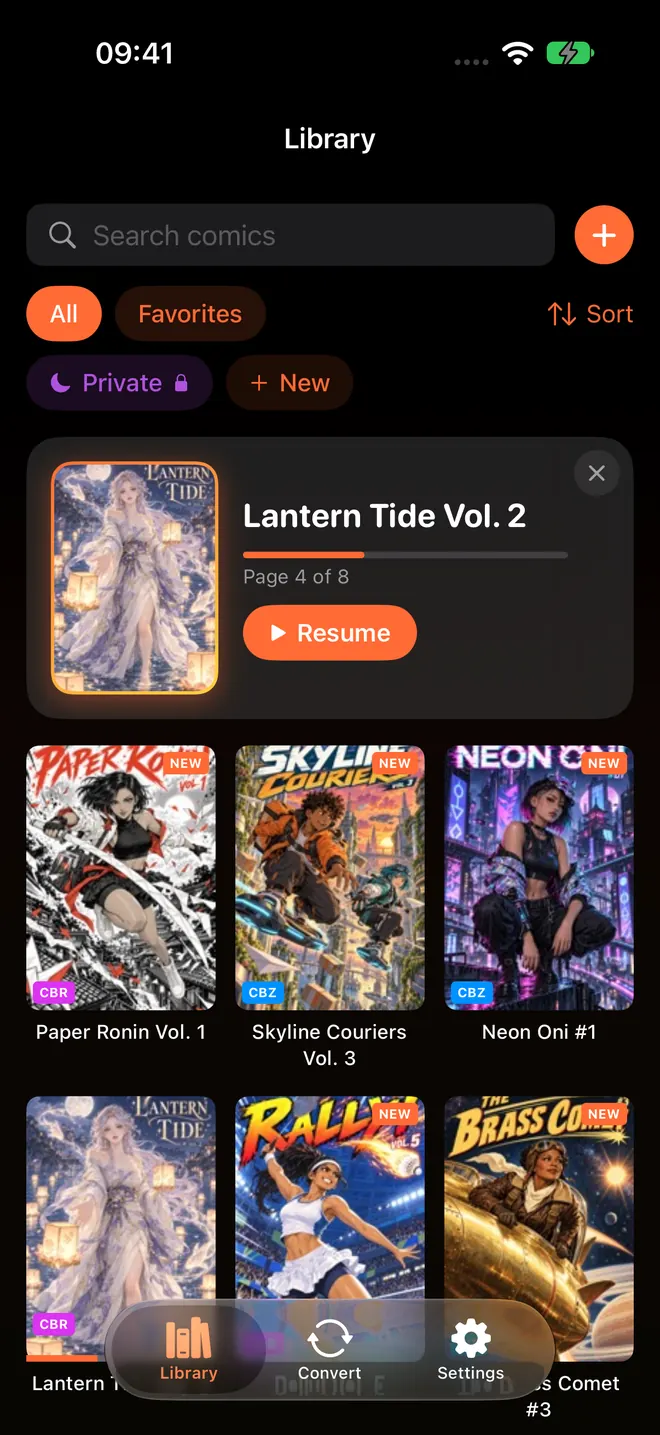
All three ways are included in the $2.99 app without Pro.
- Downloaded on the iPhone or iPad. Open ComicFlow and tap the orange + next to the library search field (on an empty library it says Import Comics), then pick the files from the Downloads folder. You can select a whole volume run at once.
- Downloaded on a computer. In ComicFlow go to Settings, then Sources, then Wi-Fi Upload, type the address it shows into your computer's browser, and drag the files onto the page. Keep the ComicFlow screen open until the Added count stops moving. Transferring comics over Wi-Fi has the details.
- Every future purchase, automatically. Make a folder in iCloud Drive, say
Manga, then go to Settings, then Sources, then Add Watch Folder and pick it. Anything you save there is imported when you open ComicFlow or pull down on the library, and the originals stay in iCloud Drive.
Read it like manga #

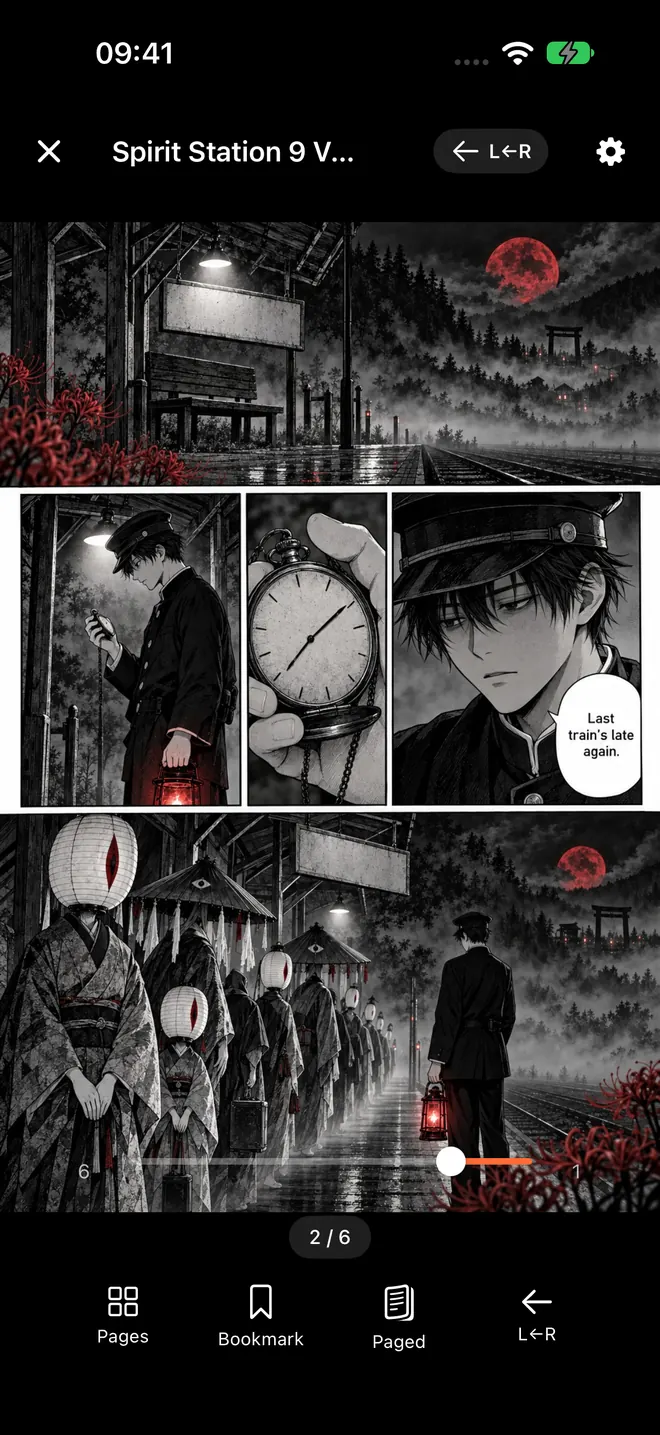
- Right to left. Open a volume, tap the gear for Reader Settings and set Reading Direction to Right to Left (Manga). Swipes, the page slider and spreads all flip to match, and ComicFlow remembers the direction for each book. Choose Manga when ComicFlow asks what you read on first launch, and new books open this way. Reading manga right-to-left on iPhone goes deeper.
- Two-page spreads. Leave Page Layout on Auto and ComicFlow shows two pages side by side whenever the screen is wide enough: on an iPhone turned sideways, and on an iPad in portrait too. On an iPhone Duo, a spread sits on either side of the fold, one page per side. Reading manga on iPhone Duo shows how that looks.
- Offline, for good. Imported files live in ComicFlow's library on the device, so they read in airplane mode with no account and no store involved. Reading comics offline covers the rest.
When to turn a PDF into a CBZ #
A bundle PDF reads well as it is. Convert it if a volume has two-page spreads stored as single wide pages: ComicFlow's Split Wide Pages setting shows each half on its own, in reading order, but it works on CBZ and other archives, not on PDFs. Open the Convert tab, tap Browse Files, pick the PDF, choose CBZ, and tap Convert to CBZ. Save the result to Files and import it with the + button. PDF to CBZ conversion is included in the $2.99 app without Pro, and your original PDF is left as it was.
Keep a copy you control #
The point of buying DRM-free is that the file is yours, so keep it somewhere that is yours too. Store the originals in iCloud Drive (the watch folder above does this) and put a second copy on a computer or an external drive. A Humble or Fanatical download page is still a web page on someone else's server, and a creator shop can close. Backing up your digital comic collection has a simple setup.
What it costs #
ComicFlow is $2.99 on the App Store, once. That includes importing PDF, CBZ, CBR, ZIP and RAR, right-to-left reading, two-page spreads, Wi-Fi Upload, watch folders, collections, iCloud Sync and conversion to PDF or CBZ. There are no ads or ad tracking. It sends anonymous usage analytics that you can switch off in Settings, then Privacy, then Share Usage Data, and that switch starts off in the EU, EEA, UK and Switzerland. The privacy policy lists what it covers.
ComicFlow Pro is an optional $6.99 one-time unlock, not a subscription. It adds EPUB export for Kobo, Boox, reMarkable and PocketBook, Komga, Kavita and OPDS servers, series, Face ID-locked collections, reader presets including a Manga preset, themes and alternate app icons. You do not need it to read a manga bundle.
Quick checklist #
- Buy from a store that says DRM-free on the product page and gives you a download.
- Download CBZ if it is offered, PDF if not. Skip EPUB for ComicFlow.
- Import with the orange +, Wi-Fi Upload or an iCloud Drive watch folder.
- Set Right to Left (Manga) and leave Page Layout on Auto.
- Keep the original files in iCloud Drive and on one more drive.
How this was checked #
Every store was checked on its own site on October 23, 2026:
- Humble Bundle: the Blue Lock: The Perfect Shot Bundle page (DRM-free download, PDF and ePub) and Kodansha's announcement (volumes, tiers, end date, volume 39 code)
- Fanatical: Downloading and Viewing your files, ebooks or comics, Activating IDW Digital Comics Experience keys and its product pages
- J-Novel Club: How it Works and its FAQ
- BOOTH: the help center answers on DRM and downloading
- Gumroad: PDF stamping
- Panels Store: its home page and terms
- BookWalker: Can I download eBooks from BookWalker for other eReaders?
- Comikey: its FAQ
ComicFlow claims were checked against the version 3.7 source code, in these files:
- Import formats, EPUB not supported, the + button:
ComicFlow/Services/ComicFilePickerTypes.swift,ComicFlow/Reader/Providers/PageProvider.swift,ComicFlow/Views/LibraryView.swift - Watch folders and Wi-Fi Upload:
ComicFlow/Services/Sources/WatchFolderScanner.swift,ComicFlow/Services/Sources/WiFiUploadServer.swift - Right-to-left, spreads and the iPhone Duo fold:
ComicFlow/Reader/Views/ComicReaderView.swift,ComicFlow/Reader/Utilities/SpreadPlan.swift - PDF to CBZ conversion, EPUB as export only:
ComicFlow/Services/Exporters/OutputFormat.swift,ComicFlow/Services/Exporters/CBZExporter.swift - What Pro covers:
ComicFlow/Services/Pro/ProGate.swift
Related reading #
- Where to find DRM-free comics: the Western comics side, from Image Comics to Humble
- How to read Humble Bundle comics on iPhone and iPad: the download page, file by file
- How to scan manga you own and read it on iPhone: for the volumes already on your shelf
- How to build a manga library on iPhone: organizing long series once you have the files
- Read manga right-to-left on iPhone: the reader settings for manga order
Frequently asked questions
Where can I buy DRM-free manga legally?
As of October 2026, the main places are Humble Bundle and Fanatical, which sell manga bundles as downloads, J-Novel Club, which sells its own manga volumes as DRM-free EPUB, and creator marketplaces like BOOTH and Gumroad, where artists sell their own work as files. The selection is limited. Many popular series are only sold through stores that lock the books to their own app.
Is the Blue Lock Humble Bundle DRM-free, and which file should I download for iPhone?
Yes. Humble's page for Blue Lock: The Perfect Shot Bundle lists it as a DRM-free download in PDF and EPUB. Download the PDF for ComicFlow, because ComicFlow does not open EPUB. If your download page also shows a CBZ button, take that instead. The bundle runs until November 12, 2026.
Can ComicFlow open EPUB manga?
No. ComicFlow imports CBZ, CBR, ZIP, RAR and PDF files. If a store offers PDF or CBZ next to EPUB, download one of those. If a store only sells EPUB, as J-Novel Club does, read those books in an EPUB app such as Apple Books.
Is BookWalker or Kindle manga DRM-free?
No. BookWalker's help pages say its books are protected with LCP DRM and cannot be converted or used as normal EPUB files. Manga bought on Amazon or through the old ComiXology store after its move to Amazon in 2022 does not come with DRM-free downloads. Those books are legal and fine to read in their own apps, but they will not open in another reader.
Do I need ComicFlow Pro to read DRM-free manga?
No. Importing PDF, CBZ and ZIP files, right-to-left reading, two-page spreads, Wi-Fi Upload, watch folders and PDF to CBZ conversion are all included in the $2.99 app without Pro. The optional $6.99 one-time Pro adds EPUB export for e-readers, Komga, Kavita and OPDS servers, series, Face ID-locked collections, reader presets, themes and app icons.