It counts the days.
You just travel.
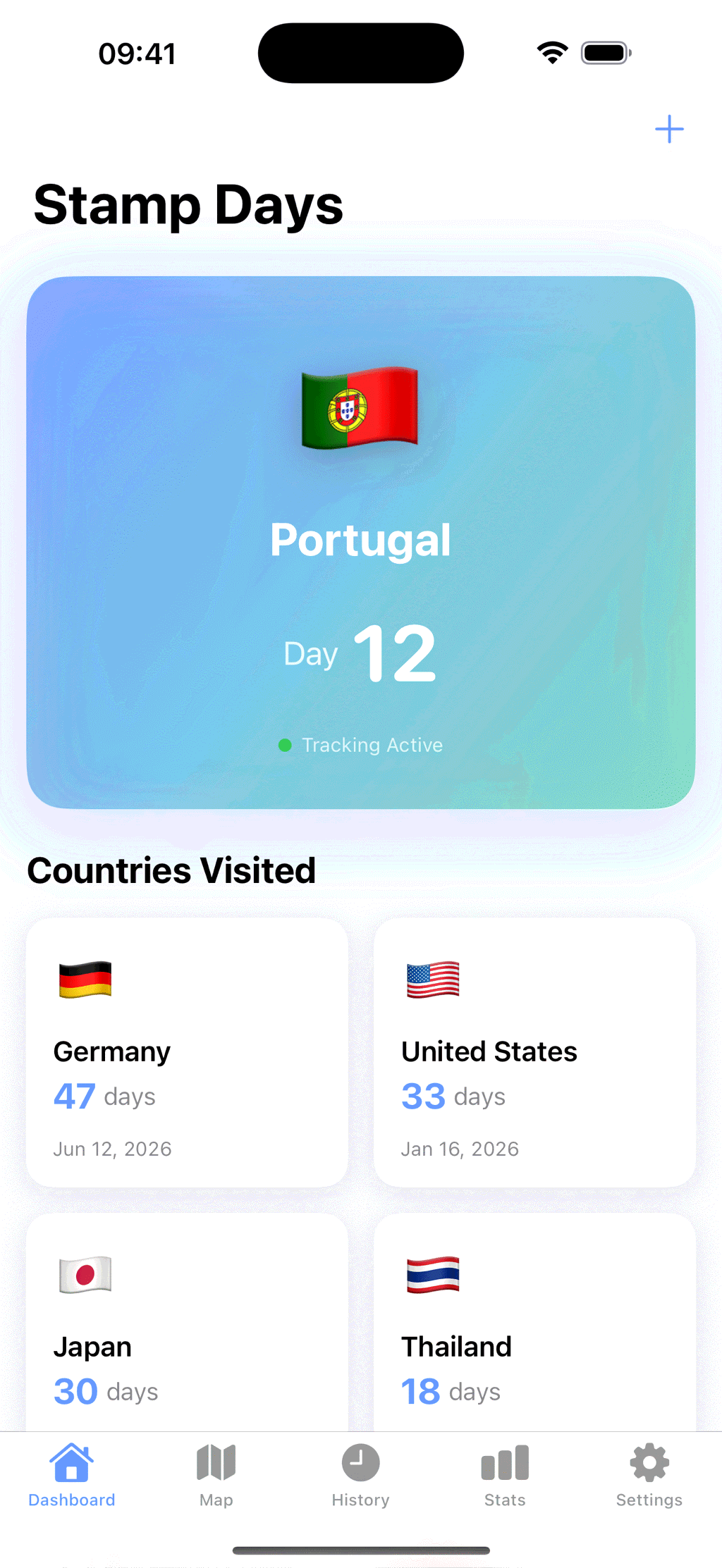
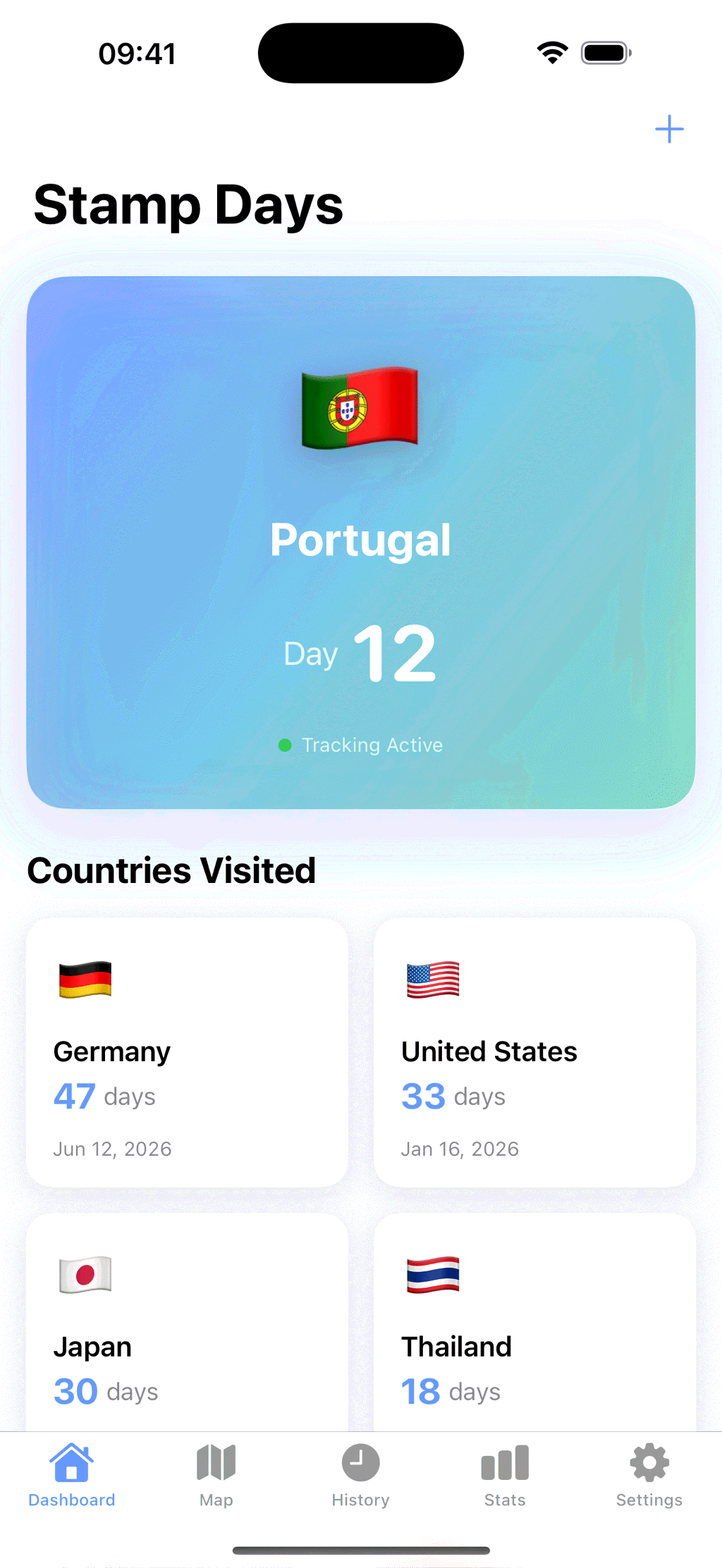
Stamp Days picks up a country change in the background and keeps the running count for every country you visit. The map, the history and the stats build themselves, and Stamp Days Pro turns the same record into a Schengen 90/180 count and your days per tax year.
What Can Stamp Days Do?
It starts with one question: how many days have I spent in this country?
The count keeps itself
iOS tells the app when you have travelled a long way. Stamp Days works out which country that is and picks the count up from there, with the app closed and your phone in a pocket.
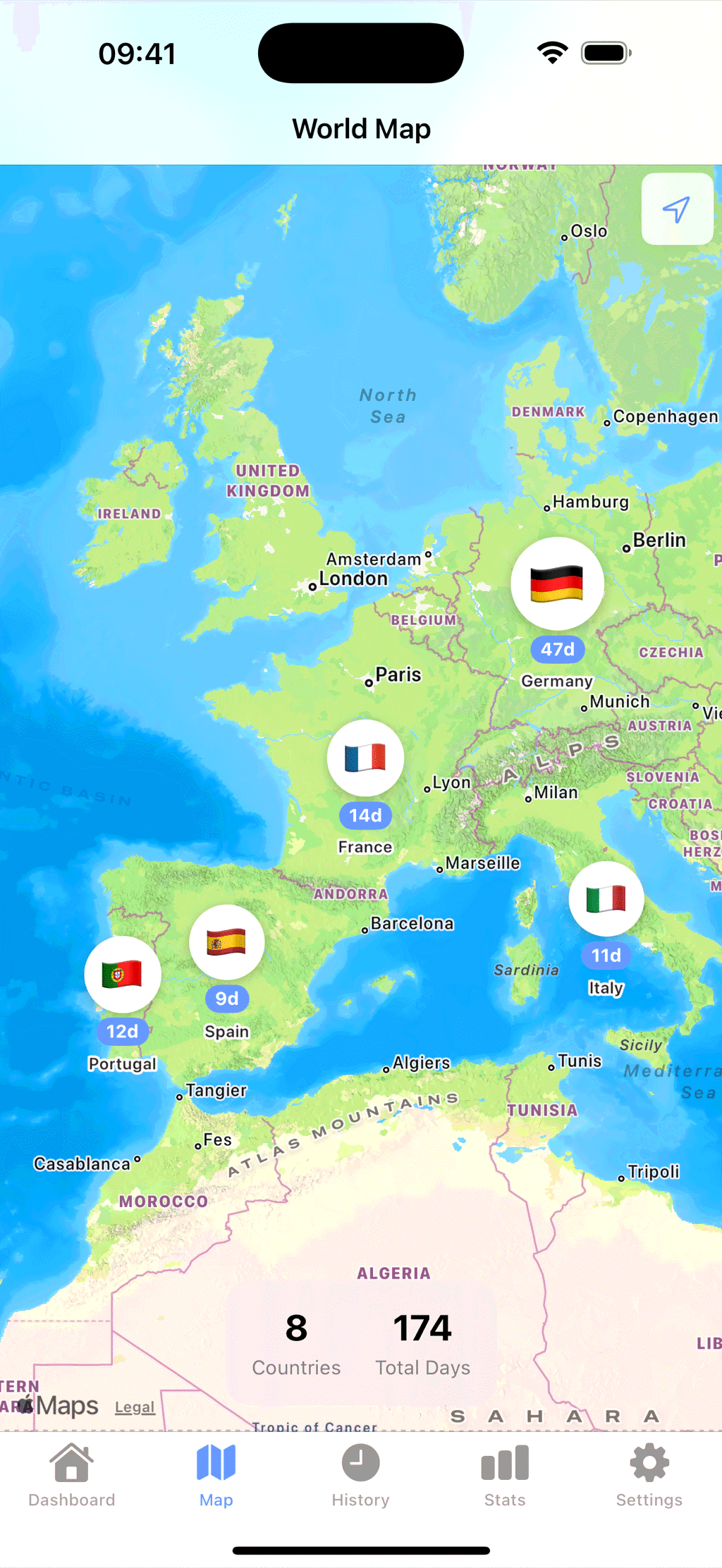
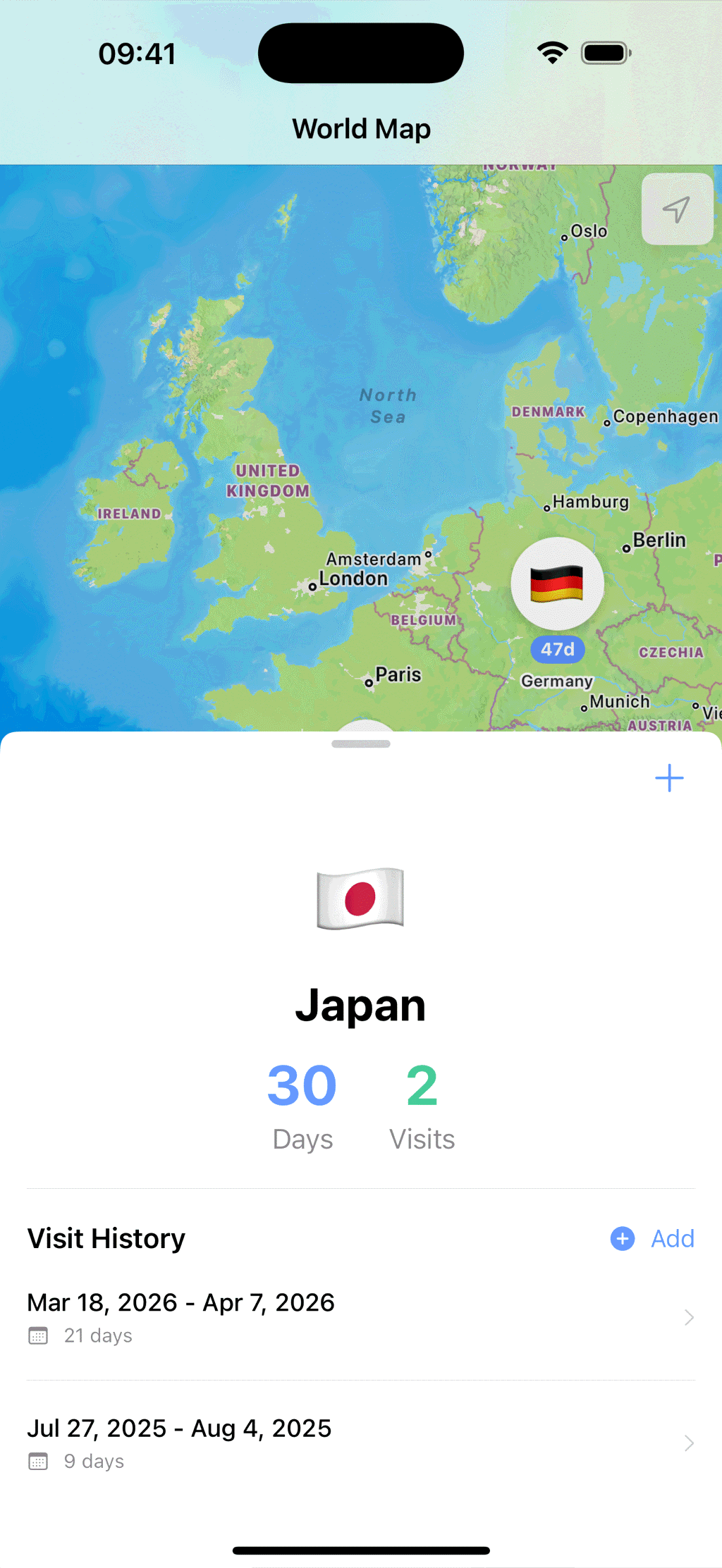
A map you can read at a glance
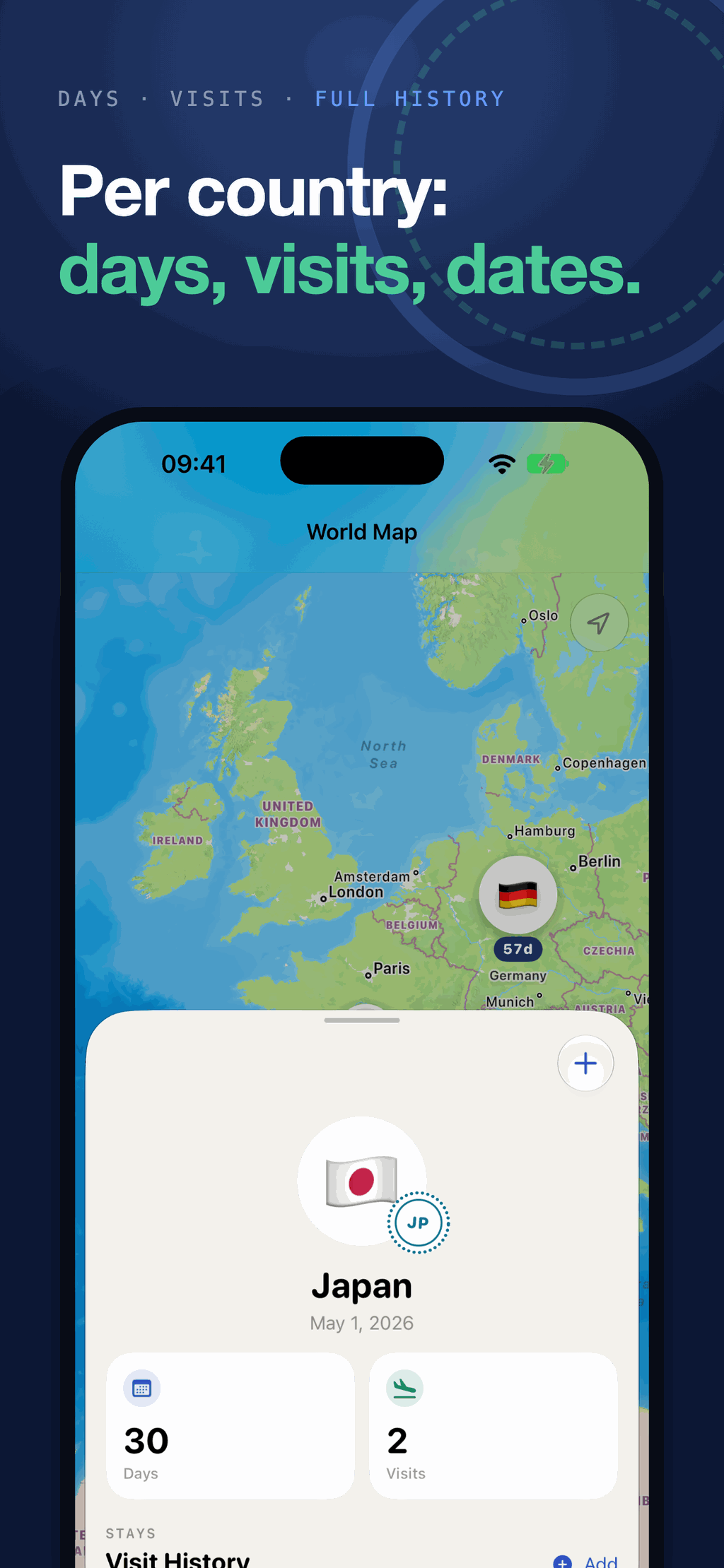
One marker per country, sized by how long you stayed. Tap a marker for the days, the number of visits and the dates of every trip you made there.
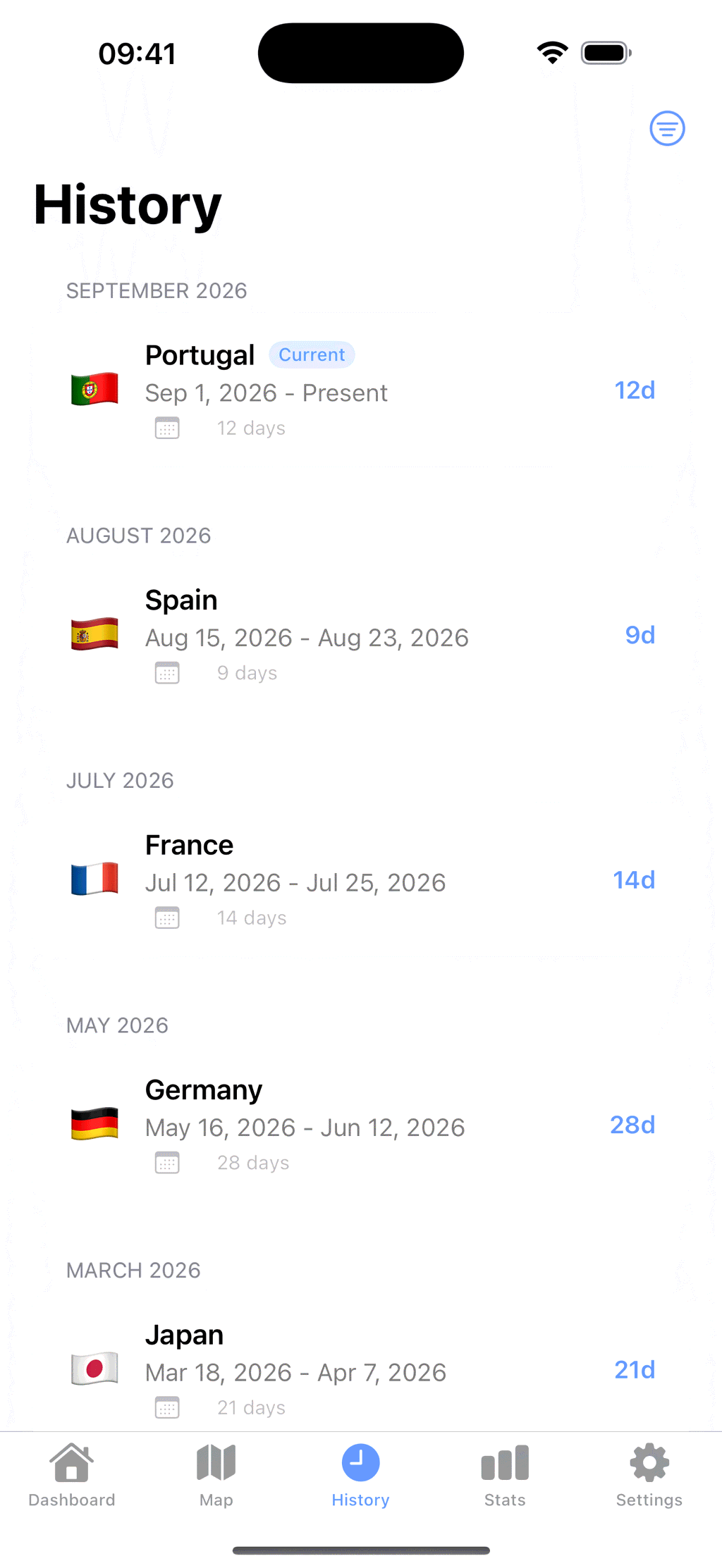
Every trip, entry to exit
Browse the history as a list or a calendar and filter it by year. Each trip shows both dates plus the length of the stay. Any entry can be corrected, which matters because the detection is a guess and not a passport stamp.
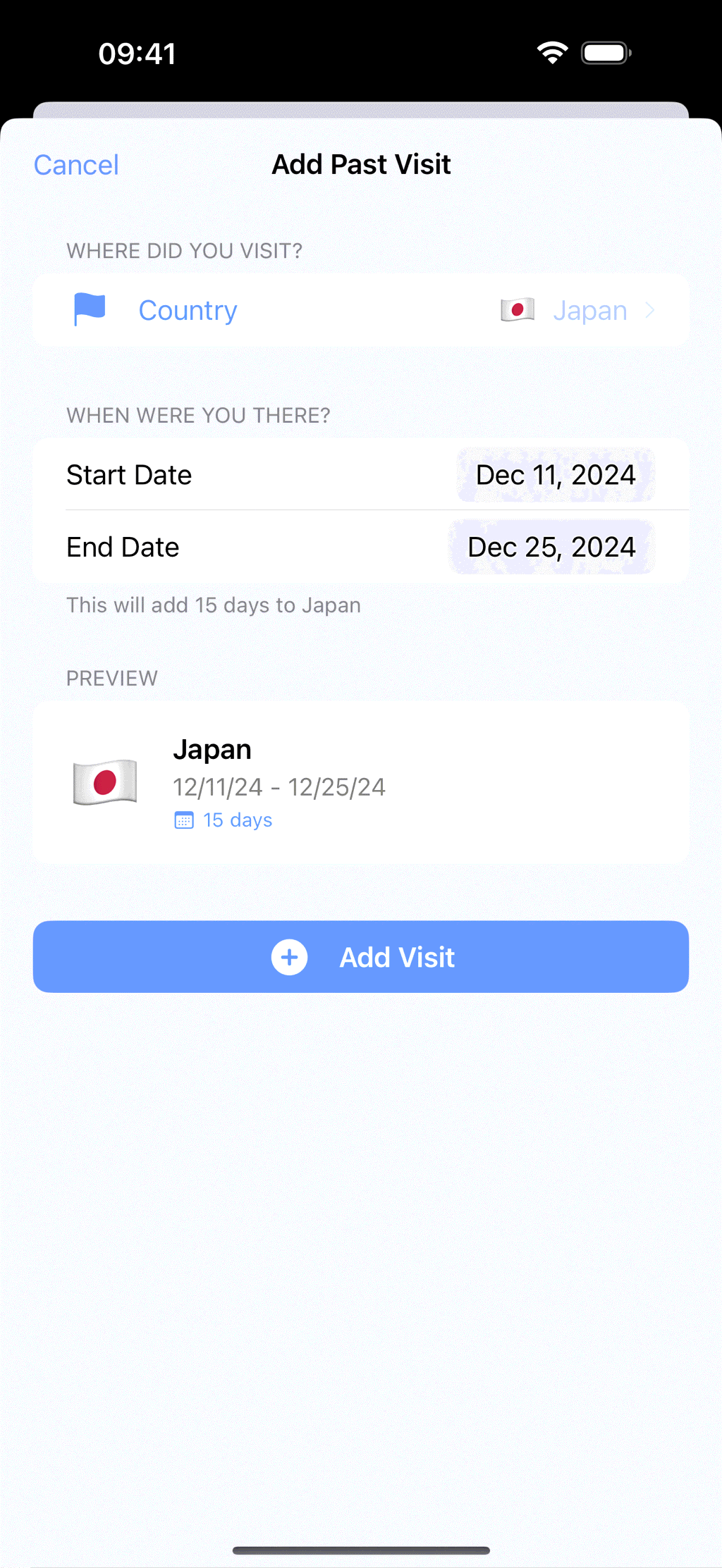
Backfill what came before
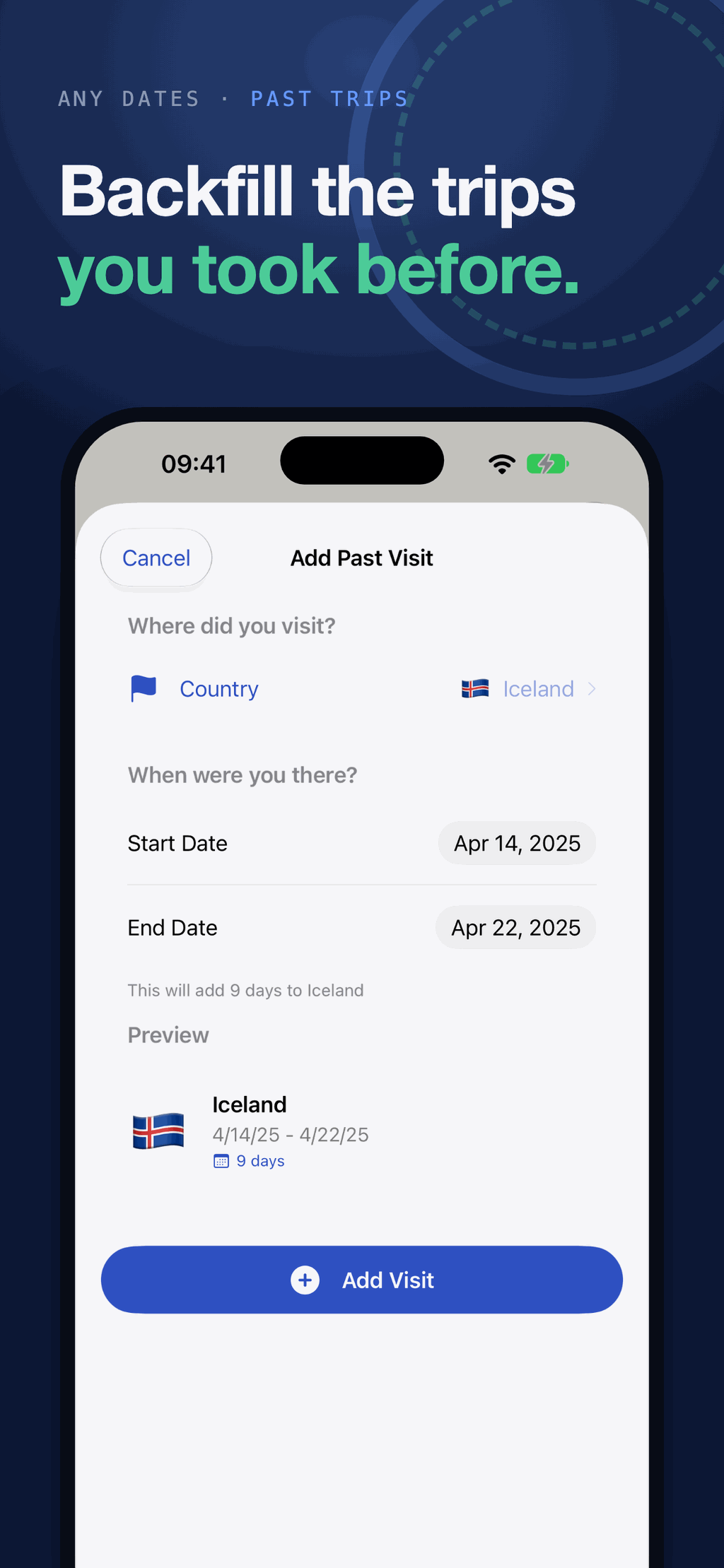
Add a trip you took years ago over any date range. The app tells you how many days it is about to add and shows a preview of the entry before you commit to it.
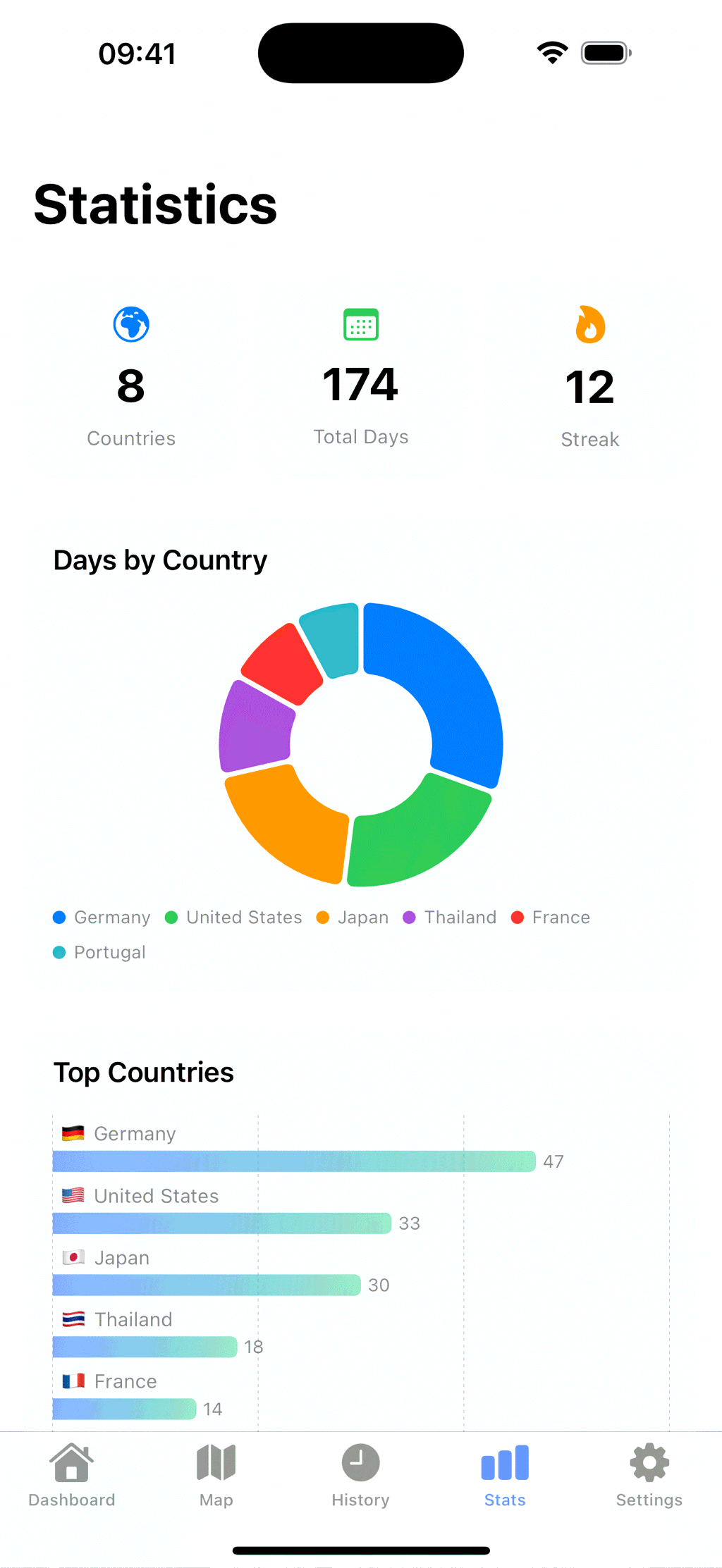
Stats that add up
Total countries, total days and the current streak on three tiles, then a days-by-country ring and a top-countries bar chart underneath. The summaries are free and the charts come with Stamp Days Plus.
Widgets on the home screen
Small, medium and large widgets show the country you are in now and the day count, without opening anything. The medium and large add your countries, total days and countries this year, and the large lists the three countries where you have spent the most days. There are Lock Screen widgets too. They are part of the free app rather than a reward for buying something, and so is On this day.
On this day
The dashboard shows where you were on today's date in earlier years. Set your Home Country in Settings and On this day leaves it out, so it shows the trips you took abroad. Without one, it leaves out the country you are in today. It is free.
Import from Photos and export
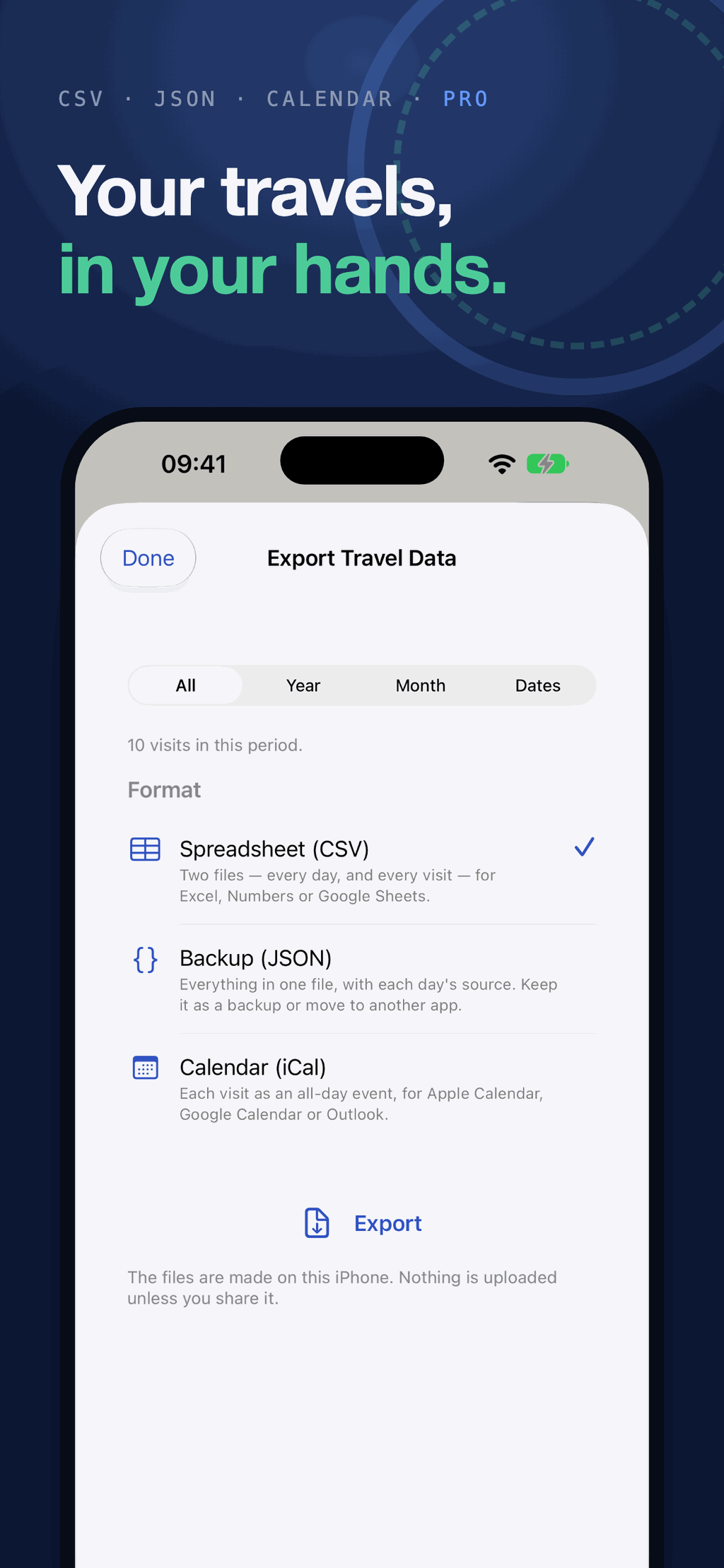
Rebuild past trips from the places your photos were taken, reading only the location tags and the dates. Export a CSV of every day and visit, a full JSON backup, or calendar events. Both come with Stamp Days Plus, a one-time purchase.
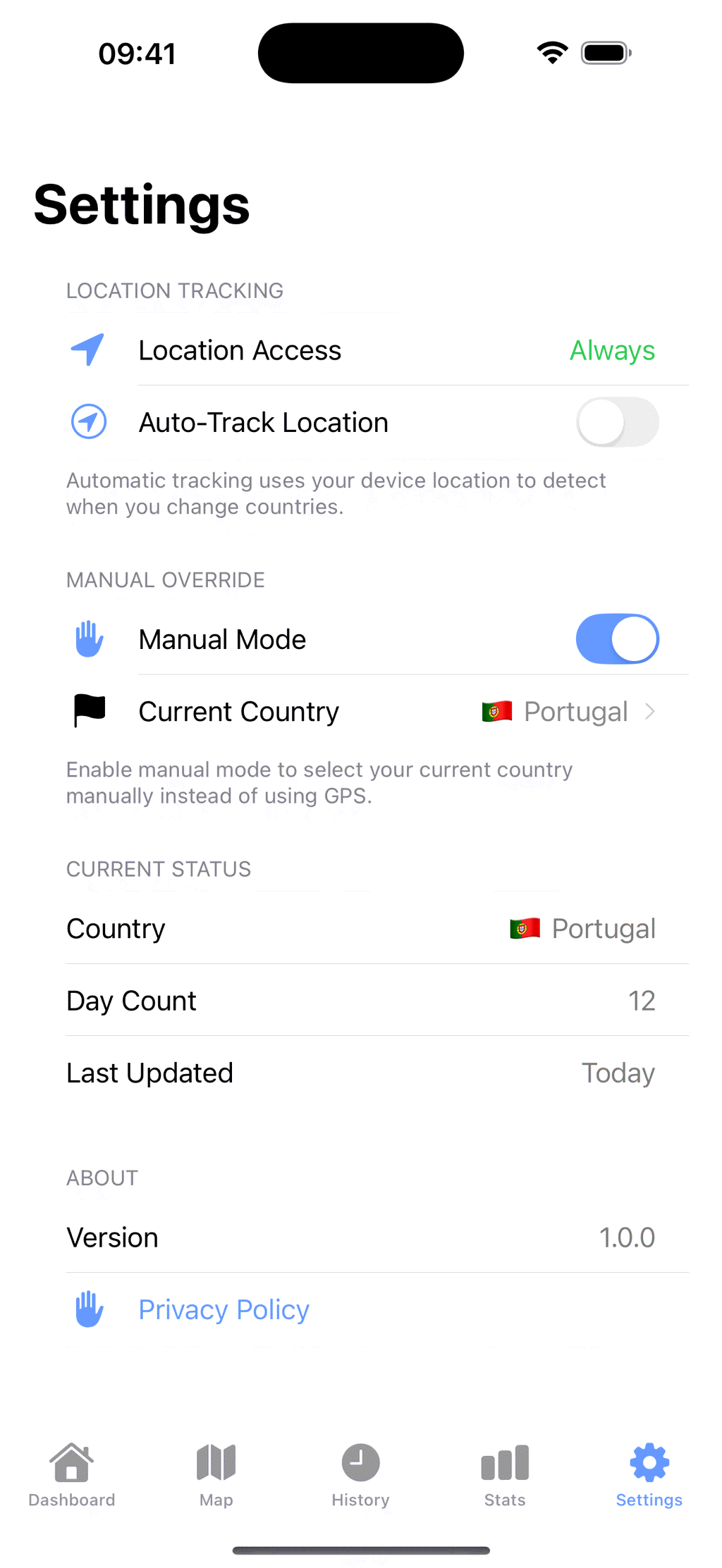
Manual mode, no GPS
Turn automatic tracking off and pick your country from a list instead. Nothing about your location is read while manual mode is on.
No account and no server
There is nothing to sign up for and nowhere to sign in. Your travel history lives in the app's own store on your phone, and deleting the app deletes it.
What's New in Stamp Days 1.8?
New widgets, a Home Country for On this day, and Settings fully translated in four languages. All of it is free.
Widgets in the app's design
The home screen widgets now look like the app's dashboard. Each one shows today's country and the day count, and the large widget adds your countries this year and where you have spent the most days.
Home Country
Set your Home Country in Settings. On this day then leaves it out, so it shows the trips you took abroad.
Settings, fully translated
Settings is now fully translated in German, Spanish, French and Italian.
Schengen 90/180 and Tax Days
The same day record that builds your map now answers the two questions frequent travellers ask most. Both are part of Stamp Days Pro, and both stay off until you turn them on and pick the date to count from.
Schengen 90/180
See how many days you have left in any 180-day period, the last day you can stay, and when your full 90 days come back. Check whether a planned trip fits before you book it.
A reminder before your last day
Stamp Days counts down to your last allowed Schengen day with local notifications on your iPhone, and you can share a border report of your stays as a PDF.
Tax Days
Your days in each country for every tax year, including the UK, Indian and Australian tax years, with midnights, travel days, the longest stay and the US substantial presence test. Share a PDF or spreadsheet with your tax adviser.
A planning aid, not legal advice: the record at the border is what counts.
Three Steps, Then You Forget About It
The setup is one permission prompt. After that the app has nothing for you to do.
Give it location access
The app asks for "When In Use" first, through a button you tap, and only asks for "Always" after that. Background access is what lets the count carry on while you are not looking.
Travel
iOS wakes the app when you have moved far enough to matter. Stamp Days turns that point into a country name, closes the old visit and opens a new one.
Check the number when you need it
The widgets have the current country and day count. The History tab has every trip with its dates, and you can fix any of them by hand.
What Stamp Days Keeps Track Of
Four running totals, each of them built from the same trip history you can edit.
Where you have been
Every country with at least one recorded day, mapped and listed.
Days abroad
The sum of every visit, and the same figure split per country.
Days in a row
How long the current stay has been running, counted from the entry date.
Times you went back
Per country, the number of separate trips and the dates of each one.
See It In Action
From the automatic day count to Schengen 90/180 and Tax Days.
What Stamp Days Won't Do
It infers a crossing from your phone's movement. That is useful, and it is not the same thing as a record of where you legally were.
Catch every crossing
A short hop over a border, a phone that was switched off, or a day with no signal can all end up logged late or missed. That is why every visit in the history can be edited.
Give legal or tax advice
The Schengen count and Tax Days are planning aids built on the day record, not legal advice. They do not know your nationality, your visas or any residence permit, and the record at the border is what counts. Take the Tax Days report to the person who actually advises you.
Detect a US state
Apple's geocoder answers with a country, never a state. You can record a state on a visit, but you set it yourself the same way you backfill an old trip.
Work without asking Apple
Turning a coordinate into the word "Portugal" means a request to Apple's location services. That part leaves the phone. Your travel history does not.
Who Is Stamp Days For?
People who need the number, and would rather not keep it in a spreadsheet.
Digital nomads
Keep a running count per country without logging anything by hand
Schengen 90/180 travellers
See your days left, your last allowed day and a reminder before it, with Stamp Days Pro
Expats and the 183-day rule
Tax Days counts each tax year and builds a report for the person who actually advises you
Frequent business travellers
Entry and exit dates for every trip, grouped by month
Long-trip travellers
Watch the map fill in as you go, sized by the time you gave each place
Anyone keeping a record
Backfill the trips you already took and have the whole thing in one list
How Much Does Stamp Days Cost?
Tracking is free and never capped. Stamp Days Plus is a one-time $4.99 purchase. Stamp Days Pro, for Schengen and Tax Days, is $9.99 a year with a 3-day free trial.
Free to download and free to use
- Automatic tracking and unlimited countries
- The map, the full history, day counts, On this day and the summary stats
- The home screen and Lock Screen widgets
- The first five visits you add by hand
- No ads and no account
One-time purchase, yours to keep
- Everything in Free
- Import from Photos, to rebuild years of trips
- The statistics charts
- Unlimited hand-added trips
- Export to CSV, a JSON backup or calendar events
Starts with a 3-day free trial
- Everything in Plus
- Schengen 90/180: days left, your last allowed day and when your 90 days come back
- Check planned trips, get a reminder before your last day, share a border report
- Tax Days for every tax year, with a PDF or spreadsheet for your tax adviser
- Renews yearly until you cancel in your Apple Account settings
Already bought the original one-time Stamp Days Pro? Schengen and Tax Days are included for you at no extra cost. Downloaded Stamp Days before it had any purchases? You keep Plus.

Free Online Tools
Browser-based tools for counting days and planning trips. No sign-up, nothing uploaded.
Schengen 90/180 Calculator
Add your trips and see how many of your 90 days you have used in the rolling 180-day window, how many are left, and the longest stay you could start on a given date.
Open tool →Pet Travel Timeline
Travelling with a dog as well? Work out when the microchip, rabies vaccination, health certificate and tapeworm treatment each have to happen.
Open tool →Stop Counting On Your Fingers
Stamp Days is free to download on the App Store, and Stamp Days Pro starts with a 3-day free trial. The support page covers how the detection behaves, what it misses, and how to correct it.
About Stamp Days
Stamp Days is a travel day tracker for iPhone, free to download, that counts how many days a traveller spends in each country. It picks up a country change without being opened, by listening to the significant location change service of iOS and then asking Apple's location services which country that point falls in. Each country gets a marker on a world map, sized by the days stayed, and each trip is stored with an entry date and an exit date in a history grouped by month. Any visit can be edited, and trips from before the app was installed can be added by hand over any date range, or rebuilt from the location tags and dates of photos with Import from Photos. The dashboard also shows where the traveller was on today's date in earlier years, leaving out the home country once one is set in Settings. The Statistics screen totals countries, days and the current streak, and charts days by country and top countries. Small, medium and large home screen widgets show the current country and its day count, the medium and large add total countries, total days and countries this year, and the large lists the three countries with the most days. Lock Screen widgets show the flag and the day count. Version 1.8, released on October 23, 2026, redesigned the widgets in the app's style, added a Home Country setting for On this day, and fully translated Settings in German, Spanish, French and Italian. History can be exported as a CSV, a JSON backup or calendar events. Manual mode sets the country by hand and uses no location data at all. US state tracking is manual for the same reason: Apple's geocoder answers with a country and never a state. Since version 1.7, Stamp Days Pro adds a Schengen 90/180 counter, which shows the days left in any 180-day period, the last day the traveller can stay and when the full 90 days come back, checks planned trips, sends a local reminder before the last day and shares a border report, and Tax Days, which counts the days in each country for every tax year, including the UK, Indian and Australian tax years and the US substantial presence test, and exports a PDF or spreadsheet for a tax adviser. Both are planning aids rather than legal advice, and the app cannot promise a complete record, because it infers a crossing rather than reading a passport stamp. Travel history stays on the device, with no server, no account and no analytics. Stamp Days runs on iPhone with iOS 18 or later and is free to download. Tracking, the map, history, day counts, On this day, summary stats and the widgets are free. Stamp Days Plus, a one-time purchase of $4.99 in the US App Store, adds Import from Photos, the charts, unlimited hand-added trips and data export. Stamp Days Pro, $9.99 a year with a 3-day free trial, adds Schengen and Tax Days to everything in Plus, and anyone who bought the original one-time Stamp Days Pro gets both at no extra cost. There is no advertising.