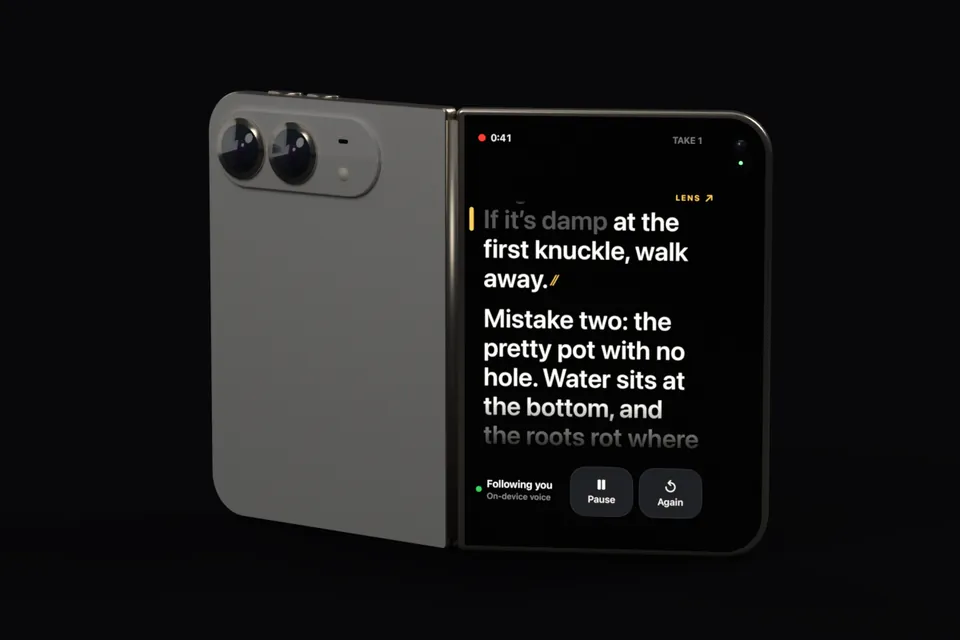
Planned for 23 October, the day iPhone Duo goes on sale
Read to the lens.The script keeps up.
Fold Cue is a teleprompter that records you. It listens on your iPhone, scrolls as you speak, and waits when you stop. On iPhone Duo your script faces you on the outer screen, right next to the main camera.
Fold Cue is a teleprompter app for iPhone that records video while the script scrolls with the speaker's voice. Speech is recognised on the device with Apple's speech framework, so no audio, transcript or script leaves the phone, and the script waits when the speaker pauses or ad-libs. A status line always says whether it is listening, following or has lost its place, and the speaker can switch to steady scroll, tap a word or use a Bluetooth page-turner to move the script by hand. Spoken commands save a take ("cut"), start over ("again"), star a take ("keep") and pause the script ("hold on"). Before each take a mic check waits for sound, and a picker chooses the microphone, including AirPods and USB-C mics. On iPhone Duo the script shows on the outer screen beside the 48MP main camera while the inner screen becomes a director's view. Export to Photos has no watermark and no time limit. A single Pro purchase, $9.99 until 6 November 2026 and $14.99 after, adds captions from the script, command trimming, take scoring, 4K, iCloud script sync and Final Cut Pro projects. Fold Cue needs iOS 26 or later, runs on iPhone only, and has no subscription and no ads.
Try it here
Read this out loud
A small version of the prompter, running in your browser. Talk and it moves. Stop and it waits for you.
REC 0:00ReadyPress record
Say a few words
Recording starts as soon as Fold Cue can hear you.
NO SOUND YET-70 dB
How to play with it
Press record and allow the microphone. The mic check waits until it can hear you, just like the app.
Read the script aloud. Stop halfway through a line and watch it hold.
Tap any word or drag the text to jump around. Keys work too.
↓→ next line↑← backSpace record or pause
What this page hears. Only how loud the room is, measured in your browser. Nothing is recorded, stored or sent anywhere. The real app goes further: it recognises the actual words on your iPhone, so it knows exactly where you are, skips ahead when you do, and notices when you ad-lib.
On iPhone Duo
The script faces you. So does the good camera.
Stand the Duo up like a book, with the backs toward you. The outer screen sits beside the 48MP main camera, so your eyes stay on the lens while the camera that matters films you.
A cue that points at the lens
The outer screen keeps the reading line near the camera, with a LENS mark pointing at it. The line you just read disappears, so your eyes have nowhere to go but up.
A director's view on the inside
Whoever's filming gets the framing, the sound level, the takes and a copy of the script across the inner screen.
Filming yourself on the inner camera?
Pick the inner front camera and the inner screen turns into one big page of script, with the reading line just under the lens.
A stand guide for the hinge
Fold Cue reads the hinge and shows whether the angle is in the range we expect to stand steadily. That range is a starting point until we've measured it on a real iPhone Duo. Recording never depends on the outer screen: if it isn't available, the inner screen carries the script.
The backs face you. The script sits on the outer screen, with a LENS mark pointing at the camera.
Good angle for standing
Rendered from a 3D model built to Apple's published dimensions, not a photo. The screens are real Fold Cue captures from the iPhone Duo simulator. Drag the phone or the slider to fold it. The stand guide uses the same angles and wording as the app.
Features
Made for the take, not the demo
The things that go wrong halfway through a recording are the things Fold Cue spends its effort on.
Following youOn-device voice
ListeningStart reading
Lost youSay the line again
It never stops without telling you
The corner of the screen always says what the prompter is doing. If it loses you, it says so and asks for the line again, instead of quietly freezing mid-sentence.
↑↓←→PgUpPgDnSpace
Take over by hand, any time
Tap a word to jump there, or drag the script by whole lines. Bluetooth keyboards and page-turner remotes work, and so does VoiceOver. A nudge before a take sets where the take starts.
-45 dBFS
A mic check before you roll
The countdown waits until it can hear you, so a muted mic never costs you a take. It skips itself if it heard you in the last 30 seconds.
iPhone micAirPodsUSB-C mic
Pick the microphone
Choose any input iOS offers, straight from the capture screen. AirPods work as a proper high-quality mic.
SAVED
Interruptions don't eat takes
Video is written in two-second pieces. A phone call or a crash keeps everything up to that moment.
UnhurriedComfortableQuick
Rehearse without the red light
A run-through records nothing, stays amber the whole time, and ends with your pace in words a minute.
AaAaAaAanear → far
Text sized for where you stand
It estimates how far away you are and sets the text size to match. It only changes between takes, so you never lose your place to a reflow.
0watermarks
Your video, as you shot it
Save to Photos or share anywhere. The free app has no watermark and no time limit.
Spoken commands
Direct yourself without touching the phone
Say it between lines and Fold Cue does it. It only listens for commands where you're off the script, so a line that happens to contain the word "cut" stays a line.
Take 4Pro trims the command out
The free app saves the take when you say it. Pro also cuts the word out of the finished video.
Cut
Saves the take.
Again
Ends this take and starts again from the top.
Keep
Stars the take, so you can find the good one later.
Hold on
Holds the script where it is until you carry on.
Screenshots
What it looks like on iPhone
Real screens from Fold Cue 1.0 on a 6.9-inch iPhone. iPhone Duo shots follow once the hardware is out.
RollingSaid words go grey, the rest waits for you.
Mic checkNo take starts until it can hear you.
RehearseAmber instead of red. Nothing is recorded.
Hold onThe script dims and holds its place.
ProOne purchase, listed plainly.
Pricing
Free to film. Pay once for the studio tools.
No subscription and no ads, ever. Everything you need to record a script is free for good, and Pro is a single purchase that's yours to keep.
Fold Cue
Free
The whole prompter and recorder. Not a trial.
Unlimited scriptsImport or write them in the app
Voice follow and steady scroll
Recording, the mic check and the mic picker
Spoken commands and rehearse mode
The full iPhone Duo setup
Export to PhotosNo watermark, no time limit
Nothing on this list will ever move behind the paywall.
Fold Cue Pro
$9.99 $14.99
Launch price until 6 November 2026, then $14.99. One purchase, no renewals.
Captions from your scriptSpelled the way you wrote it and timed to your voice. Burned in, or as SRT and WebVTT files.
Spoken commands trimmed out"Cut" and "again" disappear from the finished video
Take scoring and pick the bestHow much of the script each take covered, and where you stumbled
4K recording
iCloud sync of your scriptsTakes stay on the phone that filmed them
Final Cut Pro projectsYour cuts as edits, a marker at every paragraph, and the captions
Bought once, restored on any iPhone signed in to the same Apple Account.
Privacy
What you say stays on the phone. So does what you wrote.
Always on the device
Your voice, your script, your takes
Speech is recognised by Apple's on-device speech model, which downloads once per language and then works offline. No audio, transcript or script is sent anywhere.
Only if you say yes
Anonymous usage numbers
Analytics are off until you opt in, and you can switch them off again in Settings. They never include script text, titles or file names.
Only with Pro and sync on
Scripts in your own iCloud
Sync puts your scripts in your private iCloud database, where only your devices read them. Videos never sync.
Voice follow needs Apple's speech model for the script's language. Where there isn't one, the script uses steady scroll instead and tells you why.
Understand commands in every language
Spoken commands work in English and German. Scripts in other languages use the English command words.
Use the outer screen on other iPhones
The outer-screen prompter and the director's view need iPhone Duo on iOS 27.1. On every other iPhone, Fold Cue is a front-camera prompter with the script just under the camera.
Claim it was tested on a real iPhone Duo
iPhone Duo goes on sale on 23 October, so the Duo layouts were built with Apple's developer tools and checked in its iPhone Duo simulator. We'll film on a real one as soon as we can and update the app from what we learn.
Edit your video
It trims commands and adds captions. For anything more, Pro hands the take to Final Cut Pro with your cuts and markers already in place.
Your lines, at eye level.
Fold Cue is planned for 23 October 2026, the day iPhone Duo goes on sale. It works on any iPhone with iOS 26 from the same day.
We use Google Analytics cookies to understand how visitors interact with our website. This helps us improve our content and user experience. These cookies collect anonymous data about page views and navigation.
You can accept or decline analytics cookies. Your choice is stored locally and you can change it anytime via the "Cookie Settings" link in the footer. Learn more in our Privacy Policy.