
You are three pages from the end of a chapter, the villain finally shows his face, and a video ad for a mobile game takes over the screen. You wait for the countdown, hunt for the tiny close button, miss it, and land in the App Store. By the time you are back, the moment is gone.
If you read manga on your phone, you know this one. Most free manga apps pay their bills with ads, and manga is a format where ads hurt more than anywhere else, because the whole point is pacing. This guide covers what "ad-free" should actually mean, where ad-free manga comes from, and how to set up a reader that never interrupts a page. The reader I use is ComicFlow, which I build: $2.99 once for the reader and library, with an optional $6.99 one-time Pro unlock. Neither renews, and neither shows ads.
Disclosure: I make ComicFlow at Applestan. Features and prices below match the live App Store listing and the ComicFlow support FAQ.

Why manga apps are full of ads #
Running an app costs money every month, and someone has to pay for it. There are only a few ways that can work:
- Ads. The download is free, and you pay with your attention, plus whatever data the ad network collects to target you.
- A subscription. You pay every month, and the reading stops when the payments do.
- A one-time price. You pay once, up front, and the app has no reason to interrupt you afterwards.
Apps that host the manga themselves often combine the first two, because they also pay for servers and bandwidth. A reader that opens files you already own has none of those costs, which is why it can be sold once and left alone.
What "ad-free" should mean in a manga reader #
Some apps call themselves ad-free and then show a promo between chapters, or remove the banners only for subscribers. Before you pay for any reader, check these things on its App Store page and in its privacy policy:
- No ad network inside the app. No banners, no video ads, no interstitials between chapters, for every user, not only for paying ones.
- No ad tracking. No App Tracking Transparency prompt asking to follow you across other apps, because there is nothing to sell your activity to.
- No subscription to make the ads go away. "Ad-free with Premium" is a subscription with extra steps.
- Works offline. If the app needs a connection to open a volume you already downloaded, it is probably still talking to a server about you.
ComicFlow passes all four. There is no ad SDK in the app and it never shows the tracking prompt. Nothing pops up over a page while you read. The Pro screen only opens when you tap a Pro feature, and the one small promo card sits on the screen after you convert a file, where it suggests ComicFlow Pro's e-reader export or Mino, another of my apps.
To be precise about data, because "no ads" is not the same as "no data": ComicFlow sends anonymous usage analytics that help me see which features people use, and you can switch them off in Settings, then Privacy, then Share Usage Data. In the EU, EEA, UK and Switzerland they are off until you switch them on. While analytics are on, ComicFlow also records which Apple Ads campaign led to the install, without the tracking prompt and without your advertising ID. Your manga files and what you read in them never leave the device for any of this. The privacy policy has the full list.
Where ad-free manga comes from #
An ad-free reader is only half of it. The other half is manga you can actually open in one. ComicFlow reads CBZ, CBR, ZIP, RAR and PDF files, which covers the way most DRM-free manga is sold and shared:
- DRM-free volumes you buy. Some publishers, bundle sites and independent mangaka sell downloads as CBZ or PDF. Where to find DRM-free comics lists good places to start.
- Your own scans. If you scanned your printed tankobon, ComicFlow opens the folders once they are zipped as CBZ.
- Your own server. If you keep your collection on a Komga, Kavita or OPDS server at home, ComicFlow can browse, stream and download from it since version 3.7. Testing the connection works in every copy, and saving the server needs the optional Pro unlock.
Manga bought inside store apps such as Kindle or BookWalker is locked to those apps and will not open in ComicFlow. That is a limit of the store's DRM, not of the reader.
Getting files onto the phone takes a minute. Use AirDrop, the Files app, or Wi-Fi Upload from any computer browser. Transferring comics to iPhone walks through each way.

Set up the reader for manga #
Once your volumes are in the library, a few minutes of setup makes every chapter read like the printed book:
- Open a volume from the library grid. Each cover shows its file format, so you can see at a glance which ones came from which source.
- Set the direction. Tap the gear at the top right for Reader Settings and set Reading Direction to Right to Left (Manga). ComicFlow remembers it for each volume, and the page slider flips so the start of the volume is on the right. Reading manga right-to-left on iPhone has the full walkthrough.
- Pick Paged or Vertical Scroll. Paged turns one page at a time, like a tankobon. Vertical Scroll suits long strips and manhwa.
- Choose a page layout. Single, Double or Auto. On iPad, Auto shows two-page spreads whenever there is room for two readable pages.
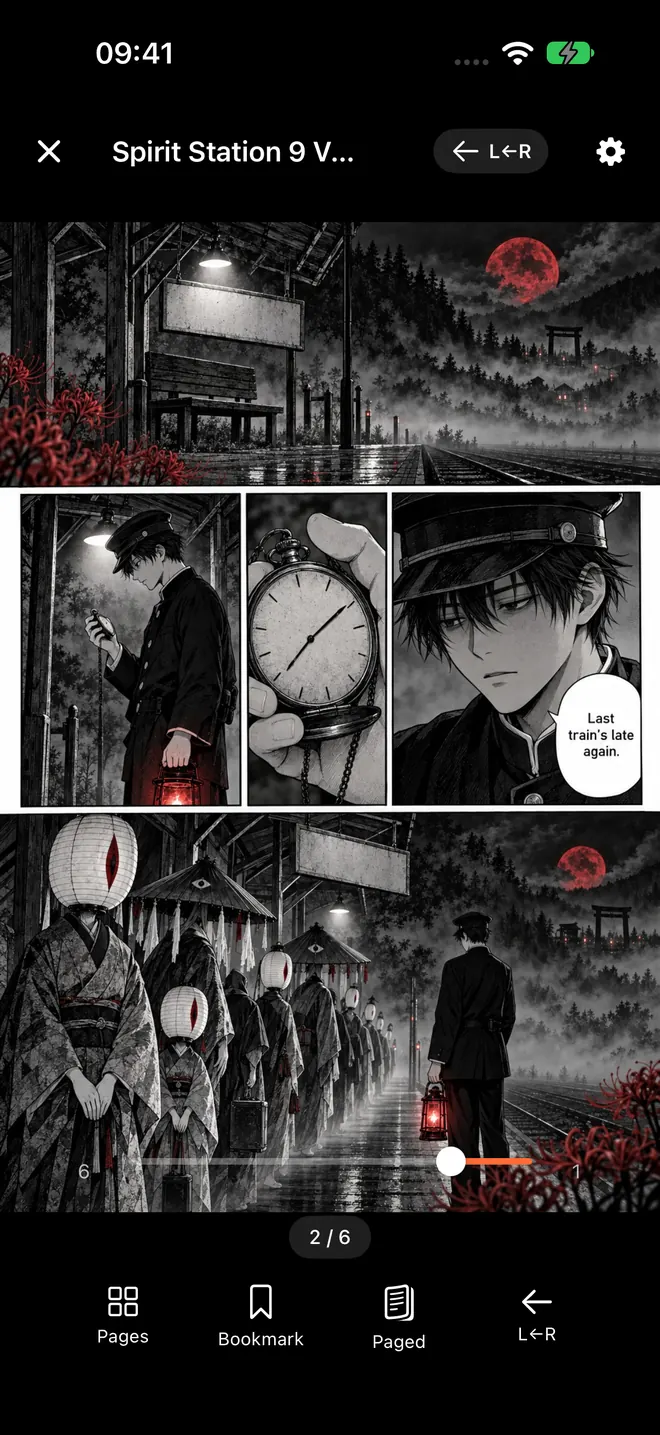
That screenshot is the whole reader. The page fills the screen, the controls sit in thin bars you can hide with a tap in the middle, and there is nothing else competing for space.
A few more things that help on a phone screen:
- Double-tap to zoom in to 3x around a speech bubble, and double-tap again to return to the full page. Pinch zoom goes up to 5x.
- Tap the outer edges to turn pages, or swipe. In manga mode, the left edge goes forward.
- Keep Screen On is switched on by default, so the screen stays awake while the reader is open.
If small lettering is a problem, manga text too small on iPhone has more fixes.
Keep your library tidy, not just ad-free #
Apps that stream manga keep your library on their side, so it can vanish when a title is pulled or the app shuts down. ComicFlow keeps everything on your iPhone. It saves your page in every volume automatically, and the Continue Reading card at the top of the library takes you back with one tap.
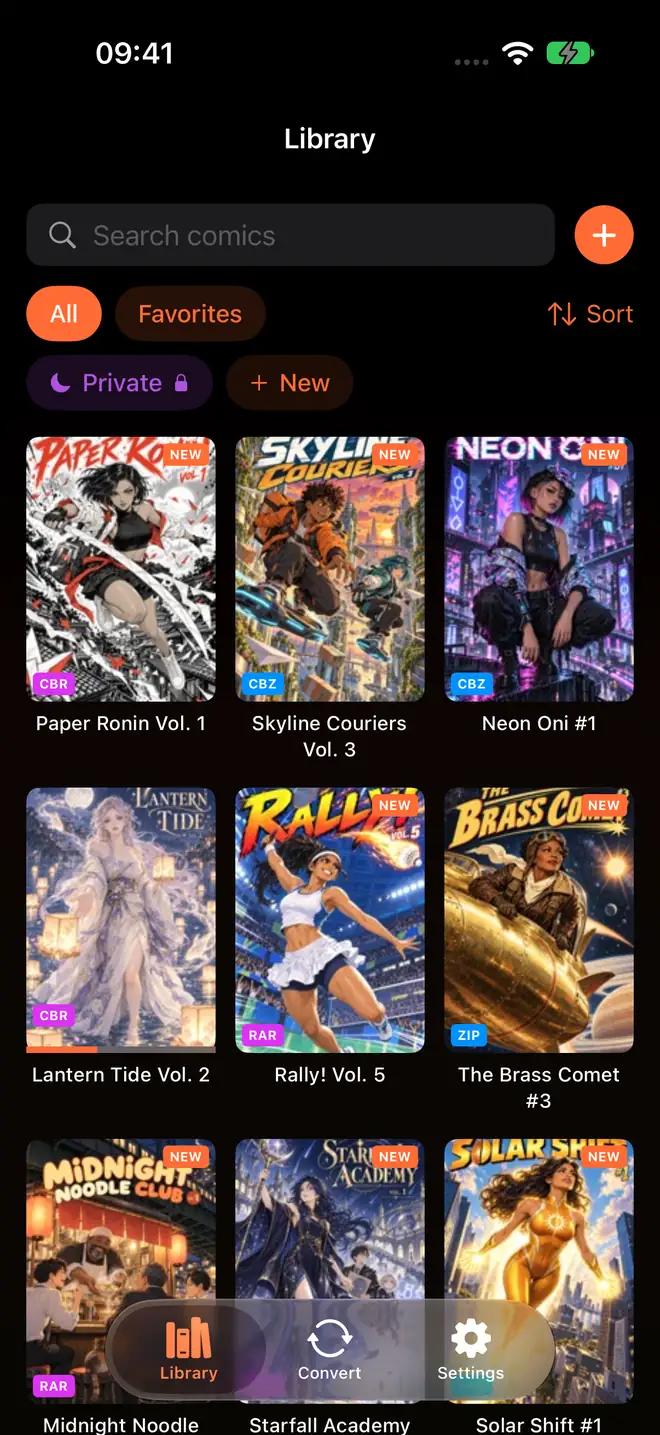
You can search your library, sort it, mark favorites, and group volumes into collections, one per series or one per mood. Bookmarks mark the pages you want to come back to, like a favorite fight or a spread you want to show a friend. Turn on iCloud sync in Settings and your place, bookmarks and ratings stay matched between iPhone and iPad. Tracking manga series on iPhone shows how to keep a dozen ongoing series apart.
What you pay, once #
ComicFlow costs $2.99 on the App Store. That one purchase covers the reader, the library, right-to-left reading, zoom, bookmarks, collections, iCloud sync, conversion to PDF and export to CBZ. It has no ads, no account, and it works offline.
ComicFlow Pro is an optional $6.99 one-time unlock, not a subscription. It adds:
- Reader presets, including a built-in Manga preset that sets right-to-left reading in one tap.
- Face ID-locked collections for the shelf you would rather keep private.
- EPUB export for Kobo, Boox, reMarkable and PocketBook e-readers. You can set up the export without Pro, and Pro unlocks the export itself.
- Komga, Kavita and OPDS servers, so a collection at home can be streamed or downloaded to the phone.
Buying Pro does not remove ads, because there are none to remove. Every copy reads the same way.
Related reading #
- Read manga right-to-left on iPhone: the reader settings for manga order
- Comic reader app with no subscription: what $2.99 once gets you, and what Pro adds
- How to build a manga library on iPhone: buying, importing and organizing volumes
- Where to find DRM-free comics: places that sell files you actually own
- Read manga one-handed on iPhone: tap zones and zoom for the train
Frequently asked questions
Is there a manga reader app for iPhone without ads?
Yes. ComicFlow is a $2.99 one-time purchase that reads your own CBZ, CBR, ZIP, RAR and PDF manga files on iPhone and iPad. It has no ad network inside, so there are no banners, video ads or interstitials, and no ad tracking. An optional $6.99 one-time Pro unlock adds extra features, and neither price renews.
Why do so many free manga apps show ads?
Building and running an app costs money every month. When the download is free and there is no subscription, ads are usually what pays for it, which is why they appear between chapters, over pages or as videos you have to wait out.
Does ComicFlow collect any data?
ComicFlow sends anonymous usage analytics to help improve the app, and you can switch that off in Settings, then Privacy, then Share Usage Data. In the EU, EEA, UK and Switzerland it is off until you switch it on. It also records which Apple Ads campaign led to an install, without the tracking prompt or your advertising ID. Your manga files stay on your device.
Where do I get manga to read in an ad-free reader?
ComicFlow reads DRM-free files you own, such as CBZ or PDF volumes bought from stores and publishers that sell downloads, or your own scans. Books bought inside store apps like Kindle or BookWalker stay in those apps. With the optional Pro unlock, ComicFlow can also read from a Komga, Kavita or OPDS server you run yourself.
Do I need ComicFlow Pro for ad-free reading?
No. Every copy of ComicFlow is ad-free, with or without Pro. Right-to-left reading, two-page spreads, zoom, bookmarks, collections and Continue Reading are all in the $2.99 app. Pro is a $6.99 one-time unlock for reader presets, Face ID-locked collections, EPUB export for e-readers and comic server libraries.