Reading digital comics on an iPhone or iPad should be simple. You have a file, you want to read it. But Apple doesn't include a built-in reader for the most common comic formats (CBR and CBZ), and the App Store has dozens of reader apps ranging from excellent to abandoned. Picking the right one matters because you'll be using it every day if you have a real collection.
I've been reading digital comics on iOS for years and have tested all of these apps with a mixed library of CBR, CBZ, and PDF files. Western comics, manga, webtoons, everything. Here's what actually works in 2026.
Quick Comparison
| App | Formats | RTL (Manga) | Vertical Scroll | Library Manager | Price | Offline |
|---|---|---|---|---|---|---|
| ComicFlow | CBR, CBZ, RAR, ZIP, PDF | Yes | Yes | Yes (collections, tags, ratings) | $2.99 once | Yes |
| Panels | CBR, CBZ, CBR7, PDF, EPUB | Yes | Yes | Yes (smart lists) | Free + $9.99/yr | Partial |
| YACReader | CBR, CBZ, PDF, and more | Yes | No | Yes (with server) | Free | Yes |
| CHMate | CBR, CBZ, PDF, CHM | Yes | Yes | Basic | $1.99 once | Yes |
| Apple Books | PDF only | No | Yes (scroll) | Built-in | Free | Yes |
1. ComicFlow
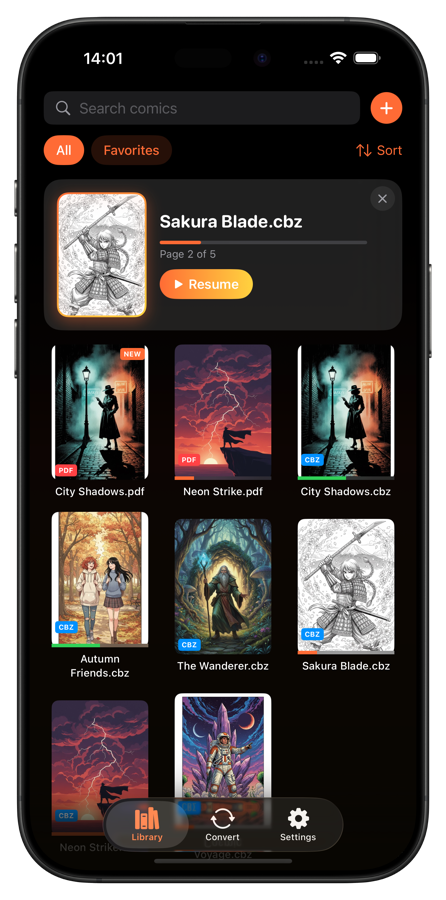
What it does: ComicFlow is a comic reader, format converter, and library manager rolled into one app. It reads CBR, CBZ, RAR, ZIP, and PDF files directly and includes a full library system with collections, ratings, and reading progress tracking.
Key features:
- Reads all 5 major comic formats natively (CBR, CBZ, RAR, ZIP, PDF)
- 5 reading modes: single page, double page, manga (RTL), vertical scroll, and auto
- Built-in CBR/CBZ to PDF converter with quality control (High, Medium, Low)
- Library manager with custom collections, star ratings, and tags
- Automatic reading progress tracking with "Continue Reading"
- Works in 6 languages, 100% offline, zero data collection
Pricing: $2.99, one-time purchase. No subscriptions, no ads, no in-app purchases.
Best for: Readers who want a complete package: read any format, organize a large collection, and never worry about subscriptions.
Pros:
- Handles every common comic format without needing a separate converter
- The built-in PDF converter is a nice bonus for sharing comics or reading in Apple Books
- Library management is solid. Collections, ratings, tags, and reading progress all work well
- One-time price with no upsells. You pay $2.99 and get everything
- 100% offline. Comics never leave your device
- Manga reading mode with proper RTL page order and mirrored scrubber
Cons:
- No cloud sync between devices (your library lives on one device)
- No EPUB or CB7 format support
- No server integration for streaming from a NAS or computer
- Relatively new app compared to some established alternatives

2. Panels
What it does: Panels is one of the most popular comic readers on iOS. It has a polished interface, supports a wide range of formats, and offers features like smart lists, OPDS server support, and iCloud library sync.
Key features:
- Supports CBR, CBZ, CB7, PDF, and EPUB formats
- Smart lists that automatically group comics by series, publisher, or reading status
- OPDS catalog support for connecting to comic servers
- iCloud sync for library data across devices
- Customizable reading experience with gesture controls
Pricing: Free to download with basic reading. Panels Plus subscription at $9.99/year unlocks OPDS, smart lists, and advanced features.
Best for: Readers who want a polished interface and don't mind a yearly subscription for premium features.
Pros:
- Very clean, modern interface that feels native to iOS
- OPDS support is great if you run a comic server at home (like Kavita or Komga)
- Smart lists are genuinely useful for large collections
- iCloud sync means your reading progress carries across iPhone and iPad
- CB7 and EPUB support cover some niche formats
Cons:
- The best features (OPDS, smart lists) are locked behind the yearly subscription
- $9.99/year adds up over time compared to one-time purchase alternatives
- Free tier feels limited and pushes you toward subscribing
- No built-in format converter
- Can be slow to import very large collections
3. YACReader

What it does: YACReader is an open-source comic reader with a companion desktop server app. The iOS app connects to YACReader Server running on your computer, letting you stream your comic library to your phone or tablet. It also works standalone for locally stored files.
Key features:
- Free and open source
- Client-server model: stream comics from your computer to your device
- Reads CBR, CBZ, PDF, and many other formats (via server)
- Reading progress syncs between desktop and mobile
- Tag-based organization through the server interface
Pricing: Free on the App Store. YACReader Server is also free (desktop app).
Best for: Tech-savvy readers who have a large collection on a home computer and want to stream comics to their iOS device.
Pros:
- Completely free with no catches
- The server integration is excellent if you already manage comics on a desktop
- Open source and actively maintained by the community
- Handles a huge variety of formats through the server
- Reading progress syncs between devices through the server
Cons:
- The server setup requires running software on a computer, which isn't simple for everyone
- Standalone mode (without server) has limited features
- Interface looks dated compared to Panels or ComicFlow
- No vertical scroll mode for webtoons
- Requires your server computer to be running and on the network for streaming
- Learning curve is steeper than other options
4. CHMate

What it does: CHMate started as a CHM file reader but has expanded into a capable comic reader. It handles CBR, CBZ, PDF, and its namesake CHM format. The reading interface is clean and simple, with support for RTL manga reading and vertical scrolling.
Key features:
- Reads CBR, CBZ, PDF, and CHM files
- Manga-friendly with RTL reading support
- Vertical scroll mode for webtoons
- Tab-based interface for reading multiple files at once
- File browser for organizing local files
Pricing: $1.99, one-time purchase.
Best for: Readers who want a no-frills comic reader at a low price, especially if you also read CHM documentation files.
Pros:
- Cheap one-time purchase with no subscriptions
- Clean reading experience with good page rendering
- RTL and vertical scroll modes both work well
- Tabs let you switch between multiple comics quickly
- Reliable and lightweight
Cons:
- Library management is basic. File browser rather than a proper library with metadata
- No reading progress tracking across sessions
- No collections, ratings, or tagging system
- Smaller user community and less frequent updates
- The CHM focus means the comic features sometimes feel secondary
- No format conversion tools
5. Apple Books
What it does: Apple Books comes pre-installed on every iPhone and iPad. It's primarily an ebook reader, but it handles PDF files perfectly well, and many digital comics are available as PDF. If your collection is already in PDF format, you might not need a separate app at all.
Key features:
- Built into iOS, no download required
- Reads PDF files with smooth page rendering
- iCloud sync for your PDF library across all Apple devices
- Annotation tools for highlighting and notes
- Adjustable brightness and background color
Pricing: Free (pre-installed).
Best for: Readers whose comic collection is already in PDF format and who want the simplest possible setup.
Pros:
- Already on your device. Zero setup
- iCloud sync works seamlessly across iPhone, iPad, and Mac
- PDF rendering is fast and high quality
- Search, bookmarks, and annotations come built in
- Rock-solid stability since it's an Apple app
Cons:
- PDF only. Cannot read CBR, CBZ, or any comic-specific format
- No manga/RTL reading mode
- No comic-specific features like double-page spread detection
- No reading progress percentage or "continue reading" for comics
- Page navigation isn't optimized for sequential art
- No library organization beyond basic collections
- If your comics are in CBR or CBZ, Apple Books is simply not an option without conversion first
Format Support Matters More Than You Think
The biggest differentiator between comic reader apps is format support. Here's why it matters:
CBR and CBZ are everywhere. If you download comics from Humble Bundle, Image Comics, DriveThruComics, or the Internet Archive, you're getting CBR or CBZ files most of the time. An app that can't read these formats cuts you off from the majority of DRM-free digital comics.
PDF is common but limited. Some publishers sell PDF comics, and you can always convert to PDF. But PDF wasn't designed for comics. Page sizes are fixed, there's no metadata standard for series/issue numbers, and PDF readers don't know about manga reading direction.
Manga needs RTL. If you read any manga at all, right-to-left reading mode is non-negotiable. The page order is reversed, and ideally the scrubber and gestures mirror accordingly. Apps without proper RTL support make manga reading frustrating.
Webtoons need vertical scroll. The webtoon format uses long vertical strips instead of pages. Without a vertical scroll mode, you're stuck zooming and panning on individual segments, which defeats the whole point of the format.
If you read a mix of Western comics, manga, and webtoons, you need an app that handles all three reading directions. ComicFlow, Panels, and CHMate all cover this. YACReader and Apple Books do not.
What About Subscription Comics?
This roundup focuses on apps for reading your own comic files. If you're looking for subscription services that provide the content too, those are a different category:
- Marvel Unlimited ($9.99/month) for Marvel's back catalog
- DC Universe Infinite ($7.99/month) for DC's library
- Shonen Jump ($2.99/month) for manga
- Crunchyroll Manga for select manga titles
These services include both the reader and the content, but you don't own the files and can't read them offline (in most cases). If you have your own CBR/CBZ collection, the five apps above are what you need.
The Verdict
For most people, the choice comes down to two questions.
Do you want a complete, self-contained solution? Get ComicFlow. It reads every format, manages your library, converts files when needed, and costs $2.99 once. No subscriptions, no server setup, no compromises on format support.
Do you want server integration? If you run a home server with your comic library and want to stream to your phone, look at Panels (with OPDS support) or YACReader (with its dedicated server app). Both handle the server-client workflow well, though Panels has the better mobile interface.
Is your collection already PDF? Then Apple Books works fine and you already have it. No need to download anything else.
For everyone else, start with ComicFlow. $2.99 gets you a reader that handles everything, and you can always add a server-connected app later if your setup grows.
Your comics deserve a proper reader. Pick one of these five and you're set.